Hardware and software

Time and attendance systems and software for UK businesses

Syncro Connect is our cloud time and attendance system. Staff clock in on one of our clocking in machines, a tablet or the Syncro Connect app, timesheets build themselves, and approved hours export straight to Sage, Pegasus, QuickBooks and other payroll packages. Computime has supplied time and attendance systems to more than 800 UK businesses since 1989.

Works with our clocking in machines and biometric terminals

Cloud based, nothing to install, and it works on any device

Reporting, Leave Connect absence tracking and live attendance

Leeds based, with UK support and UK data storage

From £2 per employee per month, or £3 with the Syncro Connect app, excl. VAT, billed annually, with monthly billing also available. No setup fees, and our Leeds team helps you set up your shifts and pay rules.

Free trial, no card required · Supporting UK businesses since 1989
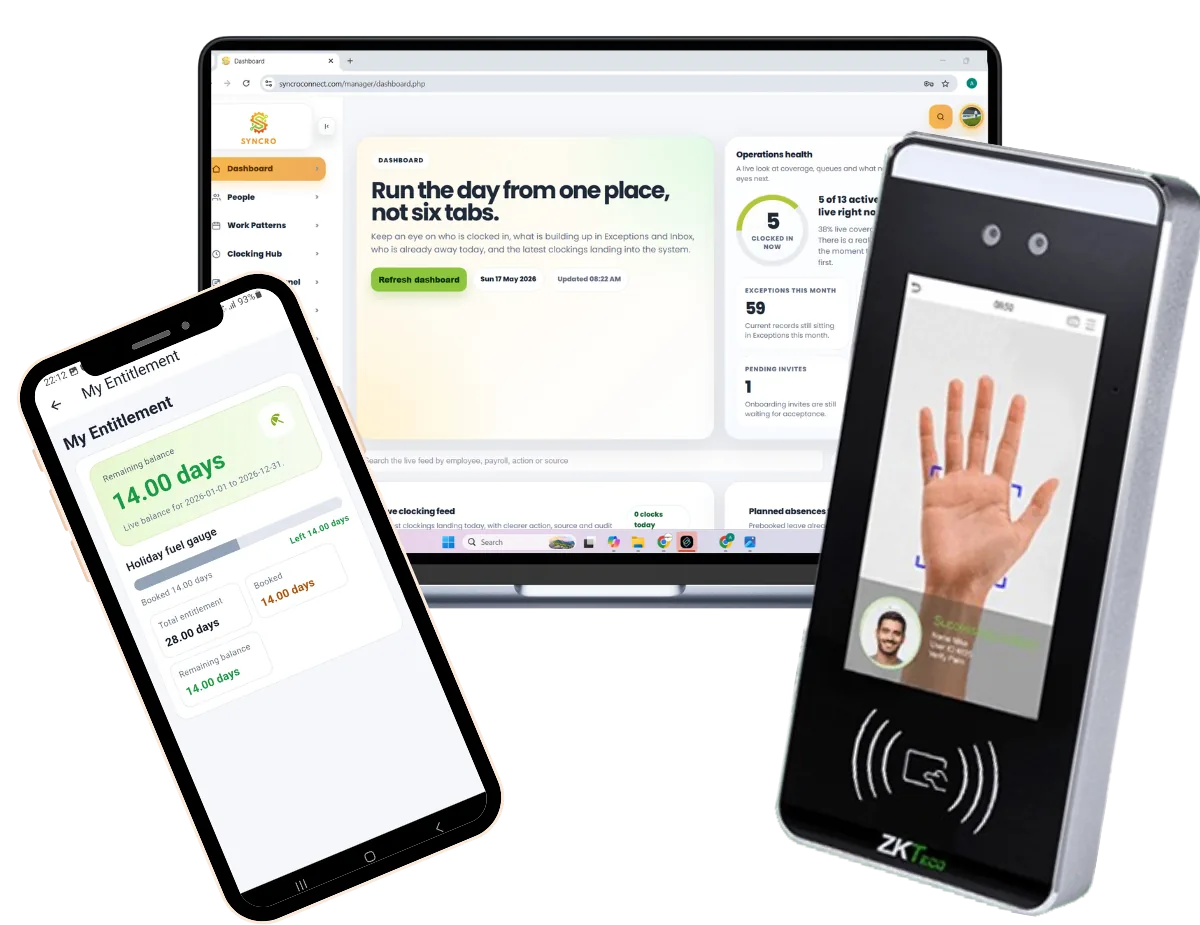
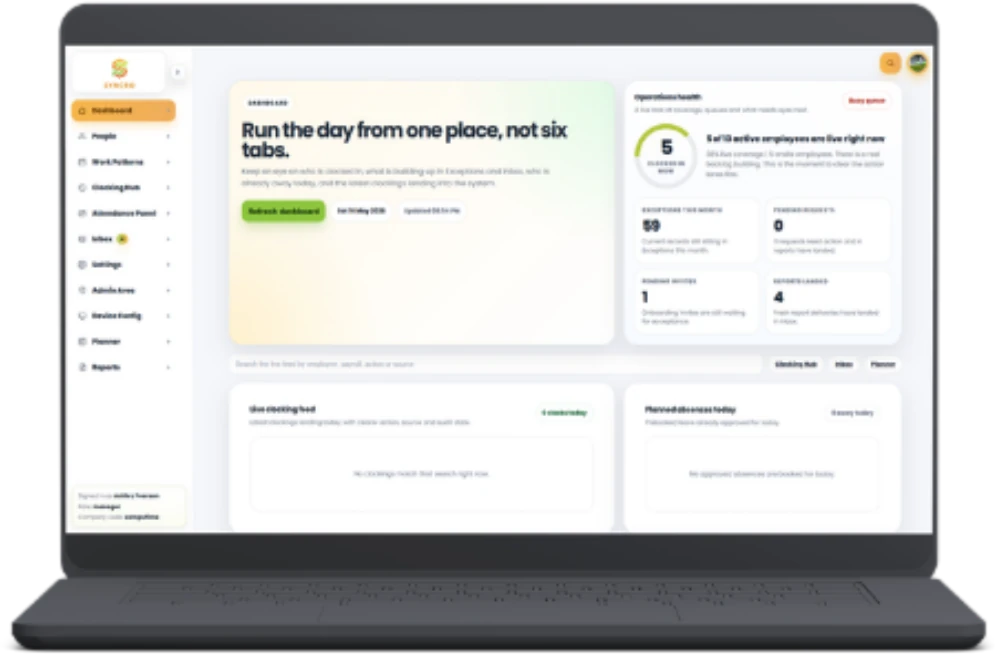
Computime time and attendance system dashboard alongside a biometric clocking-in machine

What is a time and attendance system?

A time and attendance system records when employees start work, finish and take breaks, replacing paper timesheets and clock cards. Staff clock in on a biometric terminal, a card or fob reader, a mobile app or a desktop browser, and the software builds timesheets, flags lateness and absence, and produces payroll-ready hours. Ours, Syncro Connect, exports those hours ready for Sage and other payroll, from £2 per employee per month excl. VAT, with UK support from Leeds since 1989.

For UK employers that means fewer payroll errors, an accurate record of the hours each person works, which the working time rules expect you to keep, and a clear view of who is on site at any moment. Computime supplies both the clocking in system and the software behind it.

Where biometric data is used, Computime systems help you handle it in line with UK GDPR. Our data security page sets out where data is stored, who can access it, and how long it is kept.

Automated data collection

Capture hours automatically with no manual entry.

Real-time visibility

See who is on site, late, or absent as it happens.

Payroll ready exports

Approved hours export ready for Sage, Pegasus, QuickBooks, Xero, BrightPay, IRIS and ADP.

Leave Connect

Track holidays, absence and leave in one place.

Compliance and safety

Keep accurate records for audits and Fire Connect roll calls.

Cost control

Cut overtime and labour costs with better visibility.

Key features of our time and attendance system

Everything below runs on the same system with one login, and so do HR Connect for staff records and Access Connect for doors. Some parts are optional modules, priced separately.

Mobile

Clocking app

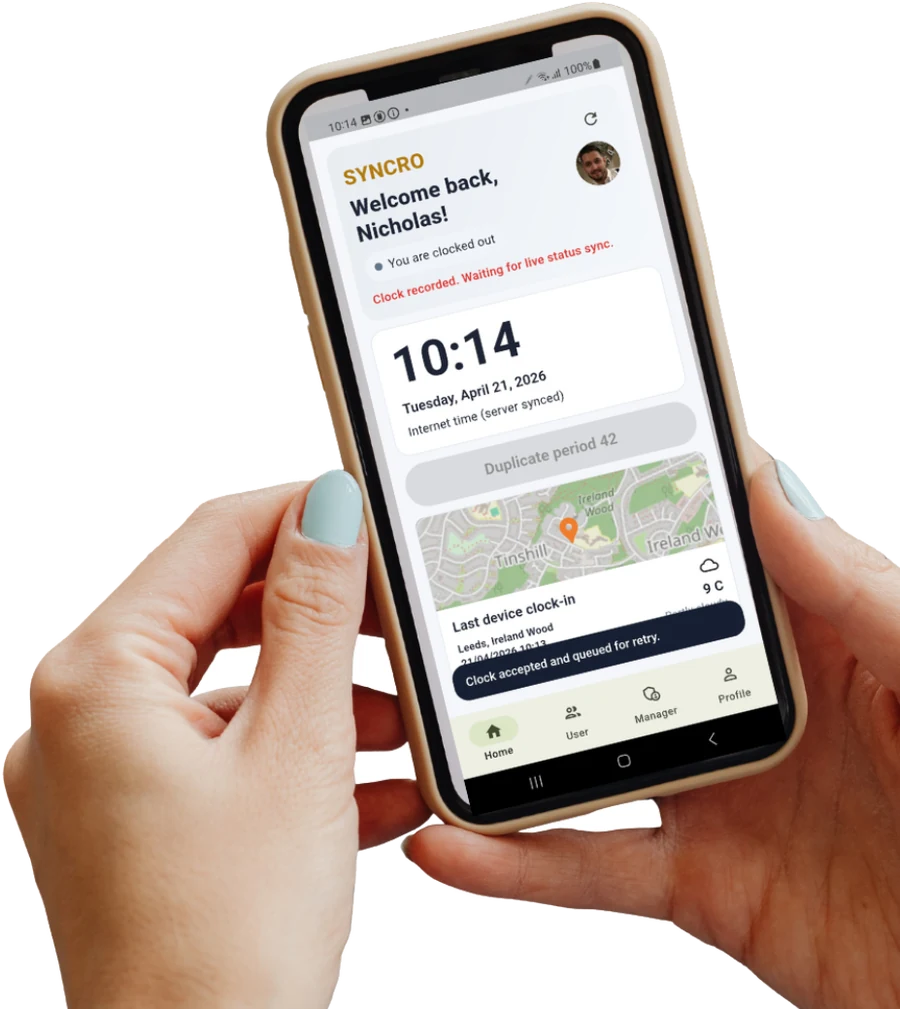
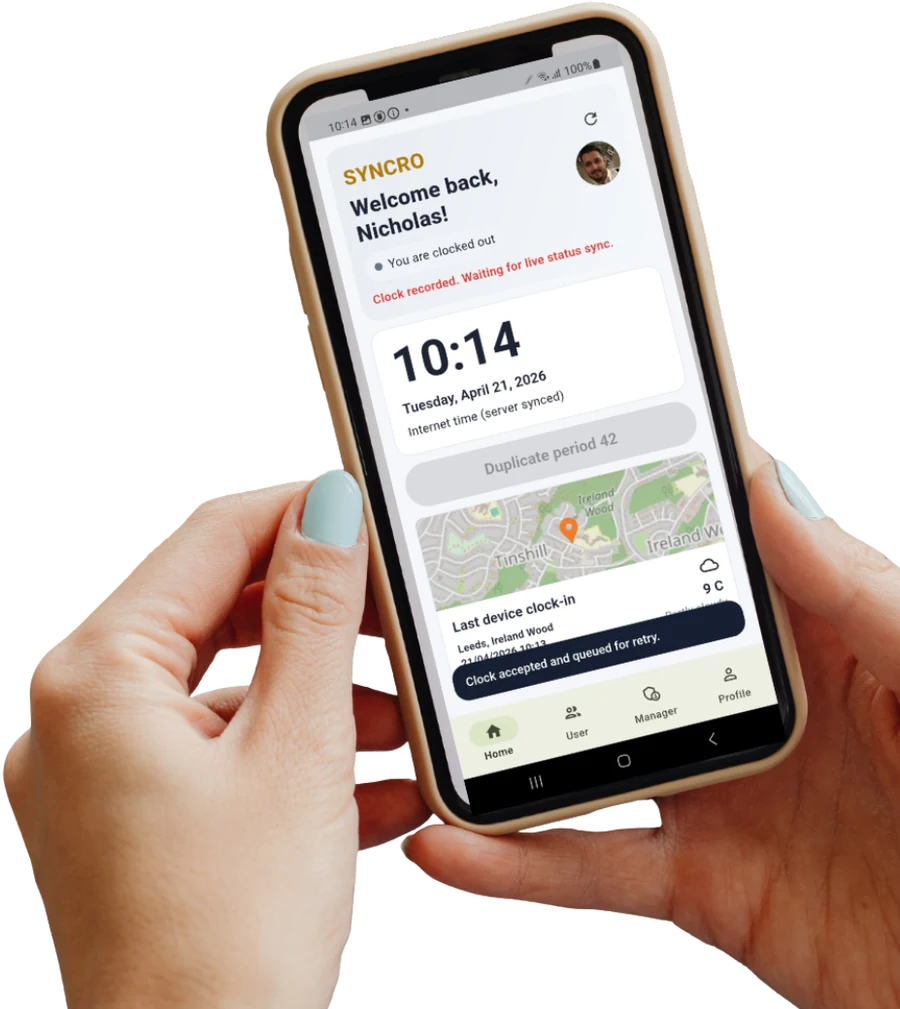
Remote workers and people on the move clock in on the Syncro Connect app, which records where each clocking was made and works offline, syncing when signal returns.

Employee clocking in on the Syncro Connect mobile app
Self-service

Leave Connect app

Staff book holiday, check their balance and see their own timesheets in the Leave Connect app on their phone, or at Syncro Kiosk on a shared tablet, which takes routine questions off HR.

Employee checking their holiday balance in Syncro Connect

Remaining balance

14.00 days

28.00 days entitlement

Payroll

Payroll ready exports

Approved hours export ready for Sage, Pegasus, QuickBooks, Xero, BrightPay, IRIS and ADP, in the same format every period, so nobody re-keys anything.

Payroll administrator preparing approved hours for export

Period export

Sage 50 Payroll

Pegasus Opera

QuickBooks

Safety

Fire Connect

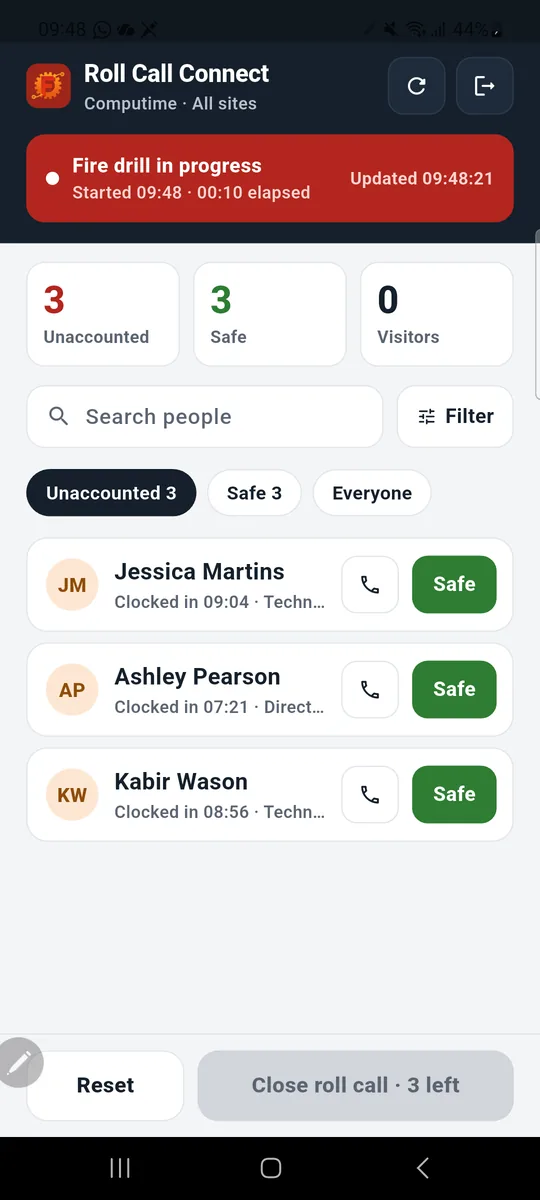
Our optional fire roll call app, Fire Connect, runs drills and accounts for everyone on site during an evacuation, using the clocking data you already have.

Fire Connect app during a fire drill, listing people still unaccounted for with Safe buttons

Roll call in progress

3

accounted for

3

still to check in

Visitors

Visitor Connect

Visitors sign in on a tablet at reception, their host is told they have arrived, and they appear on the Fire Connect roll call alongside your staff, with the optional Visitor Connect module.

Host receiving a visitor arrival message on their phone

Signed in today

Daniel Hughes, visiting Priya

10:14

Sam Taylor, contractor

11:02

On site

Live attendance display

A staff attendance display board shows who is on and off site at a glance, useful on reception, in the office or at the gate.

Syncro Connect attendance view showing who is on and off site

On site now

145

of 163

Clocked in

145

Absent

18

Who our time and attendance systems are for

We supply organisations of every size, from a handful of staff to several thousand employees, across shift-based, site-based, mobile and office teams. The hardware and the software stay the same. What changes is how we configure them around your shift patterns, pay rules and sites.

Whether you need employee time tracking, complex shift management or visibility across multiple locations, the system is built around how your business already runs rather than a generic template. See how it fits into workforce management across your whole business.

Construction & field services

  • Track mobile workers across multiple sites
  • The app records where each clocking was made
  • Makes it far harder for one person to clock in for another

View construction →

Manufacturing & warehousing

  • Manage complex shift patterns and rotations
  • Track overtime against your own pay rules
  • Clocking machines at the gate or on the shop floor

View manufacturing →

Retail & hospitality

  • Hours ready for payroll without re-keying
  • Track peak-time staffing
  • Manage split shifts and casual hours

View retail · hospitality →

Offices & hybrid teams

  • Record hours for remote and flexible working
  • Staff book holidays in the Leave Connect app
  • Maintain visibility across distributed teams

View the Syncro Connect app →

Education & public sector

  • Handle multiple departments and sites
  • Clear records and reports when you need them
  • Manage hours and term-time schedules

View Edu Connect →

Healthcare & care providers

  • Maintain accurate records for audits
  • Records you can produce when inspectors ask
  • Track shift and agency staff reliably

View healthcare →

Also working in logistics and distribution? We support drivers, depot teams and multi-site operations too.

The real cost of manual time tracking

What inaccurate timekeeping costs UK businesses

Paper timesheets and manual clocking quietly drain payroll budgets every month. Here is what the numbers say, and how an accurate time and attendance system puts that money back.

£5.8m

in minimum wage arrears identified by HMRC for 25,200 workers in 2024 to 2025 (gov.uk)

Pay what the hours say

When hours are recorded at the clock rather than remembered, the record shows what each person actually worked. That protects them from being underpaid and protects you from paying for hours nobody worked.

148.9m

working days lost to sickness or injury in the UK in 2024 (ONS)

See absence before it adds up

Leave Connect’s live absence and Bradford Factor reporting flags patterns early, so you can act on persistent absence instead of paying for it.

4.4

days lost per employee each year (ONS, 2025)

Turn lost time into clear data

Every hour is recorded automatically and exported ready for payroll, removing the manual entry where costly errors creep in.

Accurate clocking from £2 per employee per month, or £3 with the Syncro Connect app, excl. VAT, billed annually. No setup fees, and our Leeds team helps you set up your shifts and pay rules.

Book a demoStart your free trial

Free trial, no card required

Where the time goes

Payroll errors start long before payroll

Most payroll mistakes are not payroll mistakes. They start earlier, when hours are read off a timesheet, typed into a spreadsheet, then keyed again into a payroll system. Every one of those steps is a chance to get it wrong, and every correction costs somebody an afternoon.

A time and attendance system removes the copying. Hours are captured at the clock, approved once by a manager, and exported in the same format every period, ready for Sage, Pegasus, QuickBooks, Xero, BrightPay, IRIS or ADP.

  • One record from the clock through to payroll
  • Managers approve once, with no re-keying afterwards
  • Lateness and absence exceptions flagged before payroll runs
  • An audit trail you can show without rebuilding it

9 in 10

payroll teams had payroll errors in the last year

Finity Payroll Efficiency Report 2026 →

77%

of payroll staff lose up to 11 hours a week to inefficient systems

Finity Payroll Efficiency Report 2026 →

25%

of UK employees have had an incorrect payslip

Global Payroll Association, reported by HR Magazine →

Manual timesheets vs an automated system

Paper timesheets, spreadsheets and old clock card machines are familiar, and that familiarity hides what they cost. Here is the same job done both ways.

Comparison of manual time tracking against an automated time and attendance system across accuracy, payroll effort, live tracking, clocking method, data security, records for audits, employee self service and cost.
What changes Manual tracking Automated system
Accuracy Susceptible to human error Recorded to the minute, automatically
Payroll effort Manual data entry and checks Approve once, then export to payroll
Live tracking Delayed, historical data See who is on site right now
Clocking method Paper sheets or the honesty system Biometric, card, mobile or desktop
Data security Easy to lose or alter sheets Stored in the UK with logged access
Records for audits Audit trails rebuilt by hand Automatic digital log
Employee self service Every request goes through HR Staff book holidays themselves
Cost Hidden admin and error costs From £2 per employee per month excl. VAT

How a time and attendance system works

Six steps from an employee arriving on site to approved hours reaching your payroll. Once it is set up, people clock in and managers approve. Everything else happens on its own.

  1. Employees clock in

    Using a biometric terminal, a card or fob reader, the Syncro Connect app, or a desktop browser, whichever suits their role and location.

  2. Hours are recorded automatically

    Every clocking is written to your system the moment it happens, with no manual input from managers or HR.

  3. Identity and location are verified

    Fingerprint or face recognition confirms who clocked in, and the app records where each clocking was made. That makes it far harder for one person to clock in for another, and settles most disputes about hours.

  4. Managers see it live and approve

    Who is in, who is late, who is absent, across every site. Exceptions are flagged, so managers check the handful that need attention rather than all of it.

    Syncro Connect manager dashboard showing live clocking status across the workforce

  5. Staff handle their own admin

    Employees book holidays, check balances and view timesheets in the Leave Connect app, or at Syncro Kiosk, which takes the queries off HR.

  6. Payroll-ready hours come out

    At the end of each period, approved hours export ready for Sage, Pegasus, QuickBooks, Xero, BrightPay, IRIS or ADP, in the same format every time.

No signal on site?

The mobile app stores clockings on the device and syncs them automatically once connectivity returns. Clockings are kept safely on the phone until then, and nobody has to remember to do anything.

Reporting

The reports are the point of the system

Recording hours is the easy part. The value is in what you can ask of the data afterwards: which shifts run over, who is persistently late, what each site or team actually cost in labour, and whether last month was normal.

Reports run on demand or arrive by scheduled email, so the people who need the numbers get them without logging in to ask. They also give you the record of hours that the working time rules expect you to keep, without anyone rebuilding a spreadsheet the night before.

You are not limited to the reports we ship with. Build your own inside the system, filtered and grouped how you need them, without waiting on us or raising a ticket. If you would rather we set one up, just ask.

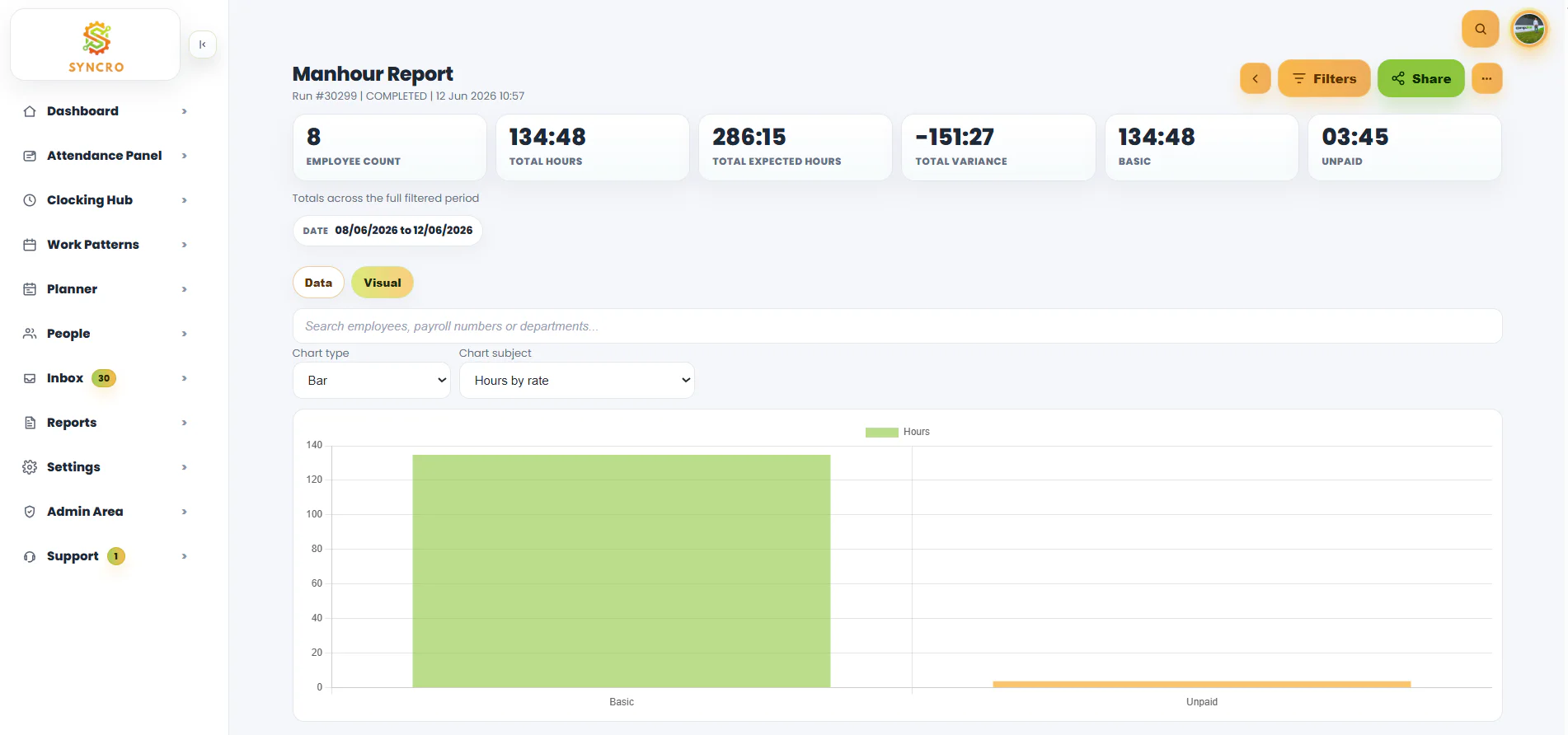
Syncro time and attendance man hour report showing total hours worked broken down by pay rate

Reports included as standard

Bradford Factor absence scoring

Scores short, frequent absence separately from long single spells, so you can spot patterns rather than totals. Uses the standard Bradford Factor formula, S² × D.

Lateness and early leaving

Who is late, how often, and by how much, across any period you choose. The conversation is much easier when it starts from a number.

Man hour analysis

Total hours worked broken down by pay rate, department, site or team, which is where most labour cost surprises turn up.

Overtime tracking

See overtime as it accrues rather than discovering it at the end of the period, when it is too late to do anything about it.

Timesheet and attendance summaries

Hours worked per employee, per team or per site, with missed clockings and exceptions flagged so you check the handful that need it.

Works with your tools

Payroll and software integrations

Once hours are approved, they leave the system ready for your payroll software to take. Same format every period, so the job takes minutes instead of an afternoon of re-typing.

S

Sage payroll

Approved hours come out in the format Sage expects, ready to import. The most common setup among our customers, and the one we are asked about most.

More on Sage and Computime →

P

Pegasus, QuickBooks and others

Export approved hours ready to import into Pegasus, QuickBooks, Xero, BrightPay, IRIS or ADP. No manual entry between the two systems, and no transcription errors to chase down afterwards.

More on payroll exports →

HR

Using something else?

Plenty of customers run payroll or HR software we have not listed here. Tell us what you use and we will confirm what the export looks like before you commit to anything.

Ask about your system →

Hardware included

We supply the clocking hardware too

Plenty of time and attendance software companies stop at the software and leave you to source terminals from someone else. We supply, configure and support both, so when something needs sorting there is one number to call and nobody telling you it is the other supplier’s problem.

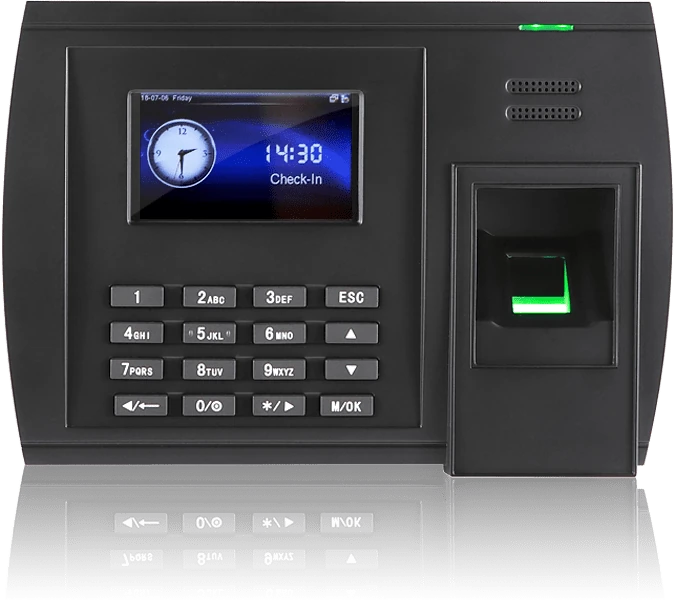
Biometric fingerprint clocking terminal

Biometric

Fingerprint terminals

Ties every clocking to a specific person, so it becomes far harder for one person to clock in for another. Prints are stored as a mathematical template, not an image.

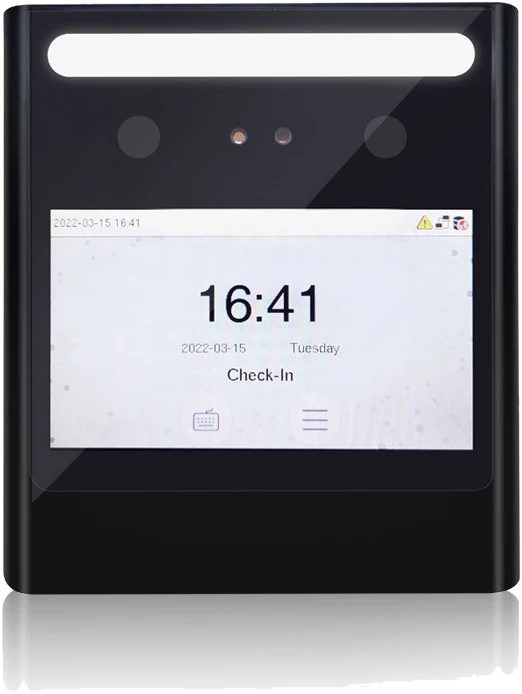
Facial recognition clocking terminal

Biometric

Facial recognition

Contactless clocking in under a second, which suits food production, healthcare and anywhere gloves or hygiene rules make fingerprints impractical.

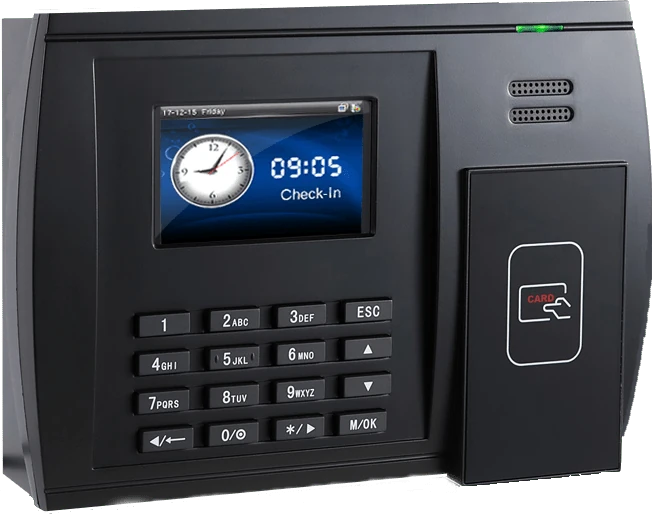
RFID card and fob clocking in reader

Card or fob

RFID card and fob readers

The straightforward option where biometrics are not wanted, and often the easiest change for a workforce moving off paper for the first time.

Employee clocking in on the Syncro Connect mobile app

No terminal

Syncro Connect app and desktop

For field teams, drivers and office staff who never pass a terminal. The app records where each clocking was made, and works offline.

Mix and match across your sites

Nothing says you have to pick one. Plenty of customers run facial recognition on the factory door, card readers in the office and the Syncro Connect app for drivers, all feeding the same system. We also supply accessories, spares and additional hardware, and where biometrics are involved our data security page explains exactly what is stored and where.

Getting started is quicker than most people expect

Our Leeds team helps you set it up, and if you have a clocking terminal it arrives ready to use. You can log in from day one, and most customers are live within about two weeks of payment.

Choose your go-live date

You pick the date

We plan around it

Set up your system with our help

Staff imported from a spreadsheet

Shifts and schedules

Your rules and rates

Your clock arrives ready

Fully pre-configured

Unbox and plug in

Or use the app, no hardware needed

Staff enrol at the device

Fingerprint or face

Seconds per person

Card and fob options

Support whenever you need it

Tickets raised in Syncro

Leeds based help desk

Maintenance and updates

No installation project, no engineer visit, no weeks of configuration

We do the setup work, so the only job at your end is plugging the clock in and letting your team enrol. Full step-by-step guides are in our help centre, and if anything is not right when your hardware arrives, one call to Leeds sorts it.

Running Realtime on your own server instead? Installations are handled hands-on by our UK team. Talk to us about Realtime.

Why choose Computime?

We have been supplying time and attendance systems to UK businesses since 1989, and more than 800 of them run ours today, across construction, logistics, healthcare, facilities management and retail.

We build the software, supply and configure the clocking hardware, and support both from Leeds. That matters on the day something goes wrong: you make one call, and nobody tells you it is the other supplier’s problem.

Syncro Connect is hosted for you, so there is nothing to install and you can log in from day one. If you would rather run it on your own server, Realtime is our installed alternative. Both use the same hardware and the same support team.

  • Independent since 1989, not private equity owned
  • Hardware, software and support from one supplier
  • Our Leeds team helps you set it up around your rules
  • No minimum or maximum number of employees, across one site or many
  • Your data stays in the UK, on UK-hosted infrastructure

800+

UK businesses trust Computime systems

1989

supplying UK workforce management since

4.4

average rating on Google

UK

based support, never an overseas call centre

What our customers say

Rated 4.4 on Google by UK customers. Here is what three of them said about moving off manual clocking.

…payroll is now processed accurately and efficiently, helping to boost morale both for our head office staff and our electricians. Real-time data means we know where our electricians are, allowing us to operate more efficiently.

James Dunlop

Financial Manager, Landworth Electrics

We are very pleased with the smooth implementation. Computime worked very hard to make sure installation was completed within the time frame and with minimum disruption. The in-depth training allowed us to focus on production and keeping our employees safe at work while ensuring efficiency.

Clare Barker

HR Manager, Wholebake Limited

I was tasked with sourcing a computerised time and attendance solution to replace our manual clocking system. The Computime website contained all the information I needed, making the decision straightforward. The software proved easy to use and the helpdesk was very helpful and friendly. Computime have exceeded all of our expectations and objectives. I would definitely recommend them.

Purchasing Manager

BSK Laminating

Want the detail rather than the quote? Read the full Landworth Electrics and Wholebake case studies.

Time and attendance system FAQs

The questions we get asked most, answered properly. If yours is not here, call the Leeds team on 0113 350 9043.

How much does a time and attendance system cost?
Syncro Connect software is £2 per employee per month, or £3 with the Syncro Connect app, excl. VAT, so a 50-person business pays £100 a month plus VAT. Those prices are for annual billing on an annual contract. Monthly billing is also available on a 30 day rolling contract. Clocking hardware is a one-off cost from £395 excl. VAT. There are no setup or account fees: you can start a free trial, move to a paid plan and use the system from day one. Staff can be imported from a spreadsheet, and our Leeds team helps you set up your shift patterns and pay rules. See our pricing page for full details.
What is the difference between Syncro Connect and Realtime?
Both handle time, attendance and absence. Syncro Connect is our cloud system, used in a web browser and the Syncro Connect app, hosted in UK data centres and ready in days, which is what most new customers choose. Realtime is installed software that runs on your own server or our UK platform, and adds job costing. Both use the same clocking hardware and the same Leeds support team. Our software page compares the two in full.
Does it work with Sage payroll?
Yes. Approved hours come out in the format Sage expects, ready to import, and the same applies to Pegasus, QuickBooks, Xero, BrightPay, IRIS and ADP. Sage is the most common setup among our customers. If you run a payroll system we have not listed, tell us which one and we will confirm what the export looks like before you commit to anything.
How long does it take to get set up?
You can log in from day one, and most customers are live within about two weeks of payment. You choose a go-live date, you import your staff from a spreadsheet and set up your shifts and pay rules with our Leeds team, and if you have a terminal it arrives already configured. For a standard Syncro Connect setup there is no installation project and no engineer visit: you unbox the clock, plug it in, and staff enrol at the device if it is a biometric terminal.
Do we have to buy clocking terminals?
No. Staff can clock in through the Syncro Connect app, which records where each clocking was made, or a desktop browser, which suits field teams, drivers and office workers who never pass a fixed point. Plenty of customers run both, with a terminal on the factory door and the app for everyone else, all feeding the same system.
Is biometric clocking legal in the UK?
Yes, but biometric data is special category data under UK GDPR, so there is more to it than switching it on. You need a lawful basis, a data protection impact assessment, and normally a non-biometric alternative for anyone who objects. Our fingerprint readers store a non-reversible mathematical template rather than an image of the print. Our data security page sets out what is stored and who can access it, and our UK GDPR guide covers what employers need in place.
What happens to biometric data when an employee leaves?
Deleting the employee removes their record from the database, along with the enrolled image if you use facial recognition. The template also sits on the clocking terminal itself, so that has to be cleared separately at the device. It is worth building both steps into your leaver process so nothing is left behind by accident.
Can it handle our shift patterns and overtime rules?
Yes, and our Leeds team helps you set it up rather than handing you a blank system. Shift patterns, rounding rules, break deductions, overtime thresholds and pay rates are all set up around how your business actually runs. Rotating shifts, split shifts, term-time hours, night rates and multi-site rules are all normal for us, and if your rules change later the system changes with them.
What reports does it produce?
Bradford Factor absence scoring, lateness and early leaving, man hour analysis broken down by pay rate or department, overtime tracking, and timesheet summaries with missed clockings flagged. Reports run on demand or arrive by scheduled email, and you can build your own custom reports inside the system if the standard set does not cover what you need.
What size of business is it for?
There is no minimum or maximum. We supply businesses with a handful of staff and businesses with several thousand employees across multiple sites, and more than 800 UK businesses use our systems. We support construction, logistics, manufacturing, healthcare, retail, hospitality and education, including remote, field based and shift based teams. Pricing is per employee, so a small team pays a small amount rather than a minimum licence fee.
What if there is no internet or phone signal on site?
The Syncro Connect app stores clockings on the phone and syncs them automatically once connectivity returns, so nobody has to remember to do anything. Clocking terminals hold their data locally too, which means a dropped connection does not stop people clocking in or out.
Can we try it before committing?
Yes. Syncro Connect has a free trial with no card required and no commitment, giving you full access to the software, the Syncro Connect app and Leave Connect. If you have complicated shift rules or specific payroll requirements, a demo is usually more useful, because we can show the system handling your situation rather than a generic example.

Guides to time and attendance

Still comparing options? These guides answer the questions buyers ask most.

Start A Conversation

Left Menu Icon