Why UK businesses choose access control

More control, less risk, one set of records

A lock cannot tell you who came in, and it cannot stop a key that was copied or never handed back. An access control system can do both, and it can tell you afterwards.

One badge, one record

The credential that opens the door also clocks the person in, so access and time and attendance are the same event rather than two systems to reconcile.

See who is on site

A live list of everyone who has entered and not yet left, which is the list you want in your hand if the fire alarm goes off.

Change access in seconds

Grant or revoke permissions when someone joins, leaves or changes role, without a locksmith and without wondering who still has a key.

Restrict by area

Server rooms, stock rooms, plant rooms and anywhere else that should not be open to everyone, controlled door by door.

A record of every entry

Every use of a door is logged, so if you need to establish who was where and when, the answer exists rather than depending on someone’s memory.

Lost credentials cost nothing

A missing fob is disabled in seconds and replaced. A missing key means changing a lock, and every other key that fits it.

Ways to grant access

Four credential types


  • RFID cards and key fobsQuick and low cost for offices and general staff areas

  • PIN codesKeypad entry for lower security doors, with nothing to issue

  • Mobile phone credentialsUnlock from a smartphone, with nothing extra to carry or lose

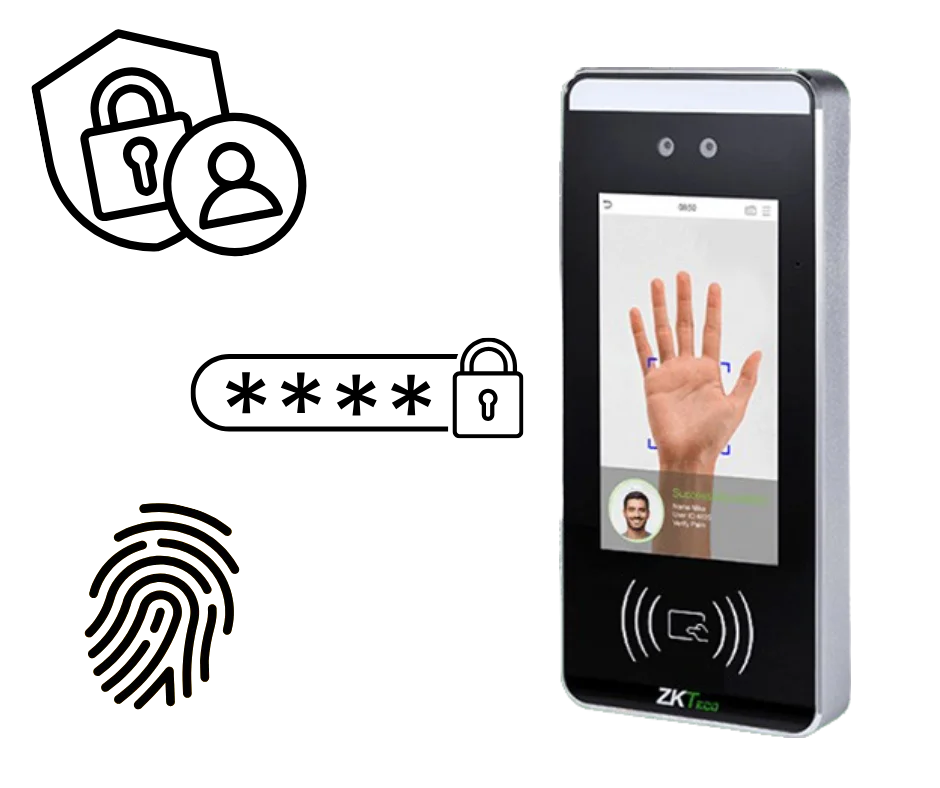
  • Biometric identificationFingerprint, facial or palm, so the credential cannot be handed to someone else

What is an access control system?

An access control system regulates who can enter a building or particular areas within it, replacing keys with credentials and giving each person their own permissions. Every use of a controlled door is recorded, so you can establish afterwards who went where and when.

The practical difference from locks is what happens when something changes. A leaver’s credential is disabled the same afternoon; a lost key means changing a lock and reissuing every key that fits it. A new starter has access to the right doors before their first shift rather than borrowing someone else’s fob for a fortnight.

Computime supplies biometric options including fingerprint door entry, facial recognition and palm, all of which work with your time and attendance records.

If you are considering biometrics, they are special category data under UK GDPR, which means consent handled properly and usually a data protection impact assessment. It is manageable and thousands of UK businesses do it, but it is worth planning rather than discovering later. Our data security page covers how the data is stored, and we will talk you through it.

How access control systems work

Every access decision follows the same three steps, and the whole thing takes about a second at the door.

  1. Authentication

    The person proves who they are, using whichever method you have chosen for that door:

    • Key card or fob
    • PIN or mobile credential
    • Biometric scan: fingerprint, facial or palm
  2. Authorisation

    The system checks whether that person is allowed through that door, at that moment:

    • The access level they have been given
    • Time of day and day of week restrictions
    • The specific door or area
  3. Decision and record

    The door opens or it does not, and either way the event is recorded:

    • Entry and exit logged with a time
    • The last door a person used
    • Time on site, and refused attempts

Internal and external doors

Office and warehouse entrances

Car park barriers and gates

Turnstiles and speed gates

Restricted zones within buildings

Doors, barriers and every other entry point

Access control is rarely just a front door. Most sites have a mix: a main entrance everyone uses, a server room only two people should reach, a yard gate for deliveries, and a back door that props open in summer.

We design around what your site actually has, from one internal door to vehicle barriers and turnstiles across several locations, and add to it as you go rather than requiring you to specify everything at the start.

Biometric access control terminal with fingerprint and facial recognition

Biometric access control systems

Where you want the credential to be the person rather than something they carry, biometric access control is the option. We supply three types:

Fingerprint recognition

The established option, and the most familiar to staff

Facial recognition

Contactless, and quick at a busy entrance

Palm recognition

Contactless, and works where gloves or dirty hands defeat a fingerprint reader

Because a biometric cannot be handed to a colleague or left at home, the Information Commissioner’s Office notes it can offer stronger access control than a card. It is also special category data, so you will need a lawful basis and usually a data protection impact assessment. We store it in the UK with access logged and we will walk you through what you need in place.

  • Makes it far harder for one person to badge in for another
  • Nothing to lose, forget at home or leave in the other coat
  • Access records that reflect who was actually there

Physical access control

Speed gates and turnstiles

A card reader on a door tells you someone valid opened it. It does not tell you how many people walked through. Where that matters, the barrier itself becomes part of the control.

What they add

  • One credential, one person through, so tailgating is dealt with at the entrance rather than noticed later
  • Alerts to security when something is forced or held open
  • Works with card, mobile and biometric credentials
  • An accurate headcount on site, which matters at a fire alarm
  • A visible signal at reception that entry is controlled

Where they earn their place

Corporate offices

Industrial sites

Data centres

Public buildings

They are not for everyone. A twelve person office does not need a speed gate, and we will say so.

Designed around your site

Access control is not a product you take off a shelf. Which doors, which credentials, who gets through when, and what happens at the fire alarm are all decisions about your building and your people.

We survey the site, quote against what is actually there, install it, and support it afterwards. The same company each time, rather than a manufacturer, a reseller and an installer who each blame the other two when something stops working.

Costs depend on the number of doors, the credential type and what is already installed, so we quote per site rather than publishing a figure that would be wrong for most people.

We can configure your system to

  • Control a single door or several sites from one place
  • Give staff, visitors and contractors different access levels
  • Restrict access by time of day, role or location
  • Feed the same records as your time and attendance and fire roll call
  • Release doors automatically when the fire alarm sounds
  • Add doors and sites later without starting again

Why choose Computime for access control?

Computime has been building workforce systems in Leeds since 1989, and we support more than 800 UK businesses across construction, logistics, healthcare, facilities management and retail.

Access control specialists build very good door systems and stop there. Buy from one, and your entry records live in one place and your time and attendance in another, with someone reconciling them or nobody bothering. Ours are the same records, and the same badge does both jobs.

  • Over 35 years in workforce and access systems
  • More than 800 UK businesses supported
  • Biometric, RFID, PIN and mobile credentials
  • Rated 4.5 on Google and 4.4 on Trustpilot
  • Survey, installation, training and support from Leeds

800+

UK businesses trust Computime

35+

years of UK experience since 1989

4.4

from 23 Trustpilot reviews

UK

survey, install and support from Leeds

Access control FAQs

What UK businesses ask us before they fit access control. If yours is not here, call the Leeds team on 0113 350 9043.

What is a commercial access control system?
A commercial access control system controls who can enter a business premises and which areas within it they can reach, using credentials such as cards, fobs, PINs, mobile phones or biometrics instead of keys. Each person is given permissions, entry can be limited by time of day and by door, and every use of a controlled door is recorded so you can establish afterwards who went where and when.
How much does a commercial access control system cost?
It depends on the number of doors, the credential chosen, whether the doors already have suitable locks and how the cabling runs, so any published figure would be wrong for most buildings. A single door with a card reader is a modest job; a multi-site system with biometrics and turnstiles is not. Computime surveys and quotes against the actual site. Ask for a survey.
How does Computime compare with Paxton, Salto or ACT?
They make excellent door hardware and have deeper product ranges. If access control on its own is all you need, they are a sound choice. The difference is that they do not make time and attendance, so pairing the two means either a third-party integration someone maintains or two systems reconciled by hand. With Computime the badge that opens the door is the clocking, feeding the same timesheet, payroll export and fire roll call.
Can access control double as clocking in?
Yes, and it is the main reason people come to Computime for it. One badge at the main entrance both opens the door and starts the shift. A door someone passes four times a day is not automatically the right clocking point, so most sites end up with entry doors that clock and internal doors that do not.
What happens to access when somebody leaves?
You put a leave date against them in the software and their permission is cleared everywhere, including at the readers themselves. From that date they cannot open a door or clock in, and nobody has to walk round the building with a laptop or change a lock. A key that never comes back is a lock you either replace or worry about; a credential is switched off in seconds from a desk.
How do people get out in an emergency?
Break glass units are fitted as standard on controlled doors, so anybody can release a door by hand without needing a credential or a working network. Doors can also be released automatically when the fire alarm sounds, but that depends on the customer’s alarm panel being interfaced to the door hardware, which is a design decision taken at survey rather than something that happens by default. Your fire risk assessment should drive that decision.
What happens if the power fails?
It is a design decision per door. Doors on escape routes are specified to fail safe, meaning they release and let people out. Doors protecting something valuable are usually specified to fail secure, so they stay locked. Battery backup keeps the system running through short interruptions, and the fire risk assessment should drive which doors are which.
Who is accounted for after an evacuation?
Because the system knows who came in and has not left, it can produce the list of who should be at the assembly point, and show how many people were last recorded in each zone of the building. With fire roll call that list is on the marshals’ phones rather than printed inside the building, and several marshals can work the same list at once from any authorised device. It covers staff and signed-in visitors, though no system knows about somebody who walked out of a side gate without using a reader.
Is biometric access control allowed under UK GDPR?
Yes, and thousands of UK businesses use it, but biometric data used to identify someone is special category data, so there is more to do than with a card. You need an appropriate lawful basis, staff need clear information about what is held and why, and a data protection impact assessment is usually expected. The ICO’s guidance on special category data sets out what is expected. Cards work perfectly well if that is more than you want to take on.
Can we start with one door and add more later?
Yes, and most people do. A common route is the main entrance first, then whichever internal door caused the last awkward conversation, then the rest as budget allows. Adding a door later is a normal job rather than a redesign, and the same software manages one door or fifty across several sites.
How are visitors and contractors handled?
They get their own access level, limited to the areas they need and often to particular hours or days. Signed in through visitor management, they also appear on the same on-site list as staff. Contractor credentials can be set to expire, so nobody is still carrying working access months after the job finished.
Who installs it and who provides support?
Computime surveys, installs, trains and supports it, so one company is involved rather than a manufacturer, a reseller and a separate installer. When a reader stops working you ring Leeds and speak to someone who knows your system.
How long does access control installation take?
A single door is usually a day. A larger system depends mostly on cabling and how much of the building can be worked in at once, and it is better phased around your operation than having the main entrance out of action. The survey gives a realistic timeline before you commit.
Does access control work across multiple sites?
Yes. Sites are managed from one place, so someone who moves between locations carries one credential and one set of permissions rather than a fob for each. Access rights can differ by site, and a manager can be given oversight of their own location only.

See all FAQs
Our range of access control systems

Which credential suits you depends on the door, the environment and how much friction your staff will tolerate at eight in the morning.

Biometric fingerprint

Infrared sensor reading. The established choice where you want the credential tied to the person, and the one most staff have used before.

Learn more

Biometric face recognition

Contactless and quick, which matters at an entrance where forty people arrive in the same ten minutes.

Learn more

Cards and fobs

Simple to issue and revoke, and no biometric data to look after. Suits visitors and contractors as well as staff.

Learn more

Palm detection

Contactless, and it reads where a fingerprint often will not: gloves, dust, wet or worn hands.

Learn more

Start A Conversation

Left Menu Icon