
Edu Connect, from Computime

Edu Connect: the school sign in system for every school in your trust

Edu Connect is a sign-in, visitor and fire roll call system for schools and multi-academy trusts. It records which staff, pupils and visitors are on site at every school in the trust, signs visitors in at reception, and runs a live fire roll call on marshals’ phones.

  • One card for staff and pupils at every school in the trust
  • Visitors signed in at reception with a photo and a QR code
  • A live fire roll call, worked by several marshals at once

Sign in. Stay safe. Know who’s here. Built by Computime in Leeds, a UK software house trading since 1989.
A class register tells you who is in lessons. It does not tell you who is on site.

Registers are taken in your MIS at set points in the day, and they do that job well. But a school site moves all day long, and across a trust people move between schools as well.

If the fire alarm sounded at 10:42, the question your marshals need answering is a simple one: who is on site right now? Pupils, staff and visitors, at this school, at this moment.

Edu Connect answers it from one list, built from every card tap, kiosk sign-in and visitor arrival at every school in the trust.

Through a normal school day

  • Pupils are at clubs, activities and trips, or still on site after the last register
  • Sixth formers are on free periods, or at lessons in another school in the trust
  • Staff arrive early, leave for meetings and work across more than one site
  • Contractors, supply staff, parents and other visitors come and go, often signed in on paper

What Edu Connect does

Everything on this page is built and working today unless it says otherwise. Fire roll call and sign-in across schools in a trust have their own sections further down.

Staff and pupil sign-in

Card readers and reception kiosks

One card for staff and pupils, at every school in the trust. People tap in at a card reader or sign in at a reception kiosk, and Edu Connect keeps a live list of who is on site. If someone forgets their card or goes home without signing out, the office can add or remove a sign-in, or correct the time.

Visitors at reception

Visitor Connect kiosk app

Visitors sign in at the reception kiosk, with a photo and a QR code. Expected visitors can be pre-registered, and visitors can sign out by scanning their QR code on the way out. Printed visitor badges with photos are coming, but are not available yet.

Events and conferences

Open evenings, training days, meetings

Pre-register the people you are expecting. Each one is emailed a QR code and signs in with it at the kiosk when they arrive, so there is no queue at a paper list on the night.

Clubs and activities

QR code, card, PIN or ticked by the leader

Registers for clubs and extra-curricular activities, taken by QR code, card or PIN, or ticked off by the person running it. An activity register is kept separate from on-site status, so taking a club register does not change who is shown as on site. Schools also use activity registers for trips.

Room booking

Fixed slots, clash checks, approvals

Book rooms in fixed slots, with clash checks so the same room cannot be booked twice. Staff can request a room for a manager to approve, and the people attending are emailed the booking.

Answers without a phone call

Event log and card lookup

A plain-English event log shows why a card did not work, or whether a kiosk is online, so the office can see for itself. If a card is already in use, Edu Connect tells you who holds it, and people search finds a card number.

Built for multi-academy trusts

In a trust, staff and sixth formers do not stay in one building. Edu Connect treats the trust as one system, so the same card works at every school and people do not fall between two lists.


  1. One card, at every school

    Each pupil and member of staff has one card that works at every school in the trust. Staff who teach across two sites sign in the same way at both.


  2. A sixth former signs in at another school

    They tap their card at a reader or sign in at the kiosk, and show on that school’s list of who is on site.


  3. Their home school is told automatically

    Edu Connect emails the student’s home school, so their own staff know where they are without phoning round.


  4. The trust sees every school in one place

    Edu Connect records who is on site across every school in the trust, so trust IT, estates and business teams work from one system rather than one per school.

A live fire roll call on your marshals’ phones

When the alarm sounds, your marshals open Roll Call Connect on their phones and work from one live list of everyone signed in at that school: staff, pupils and visitors. Several marshals can work the same list at once, and everyone’s progress updates together. In a trust, each marshal picks their school after signing in.

There is no printing a list at the assembly point, and no collecting clipboards to compare at the end.

A roll call is only as good as the sign-ins behind it. Someone who left by a side door without signing out will still show as on site until they are found or their record is corrected. That is the right way round for a fire, but it is why sign-in at every door matters. A visitor who signed in yesterday and never signed out is flagged for marshals to check in person, rather than assumed either way.

Edu Connect supports your fire procedures. It does not replace your fire risk assessment, your drills or your marshals.

During a roll call

  1. The alarm sounds

    One marshal starts the roll call and every other marshal sees it straight away. The list is everyone signed in at that school at that moment, including visitors.

  2. Marshals mark people safe

    Each marshal works the same list on their own phone, tapping Safe as people are found. If a phone loses signal, the list stays readable and nobody is shown as safe unless that tap was saved.

  3. Nobody left unaccounted for

    Every marshal sees the unaccounted count fall, wherever they are standing. The roll call closes only when everyone is checked, and the record is kept for your fire log.

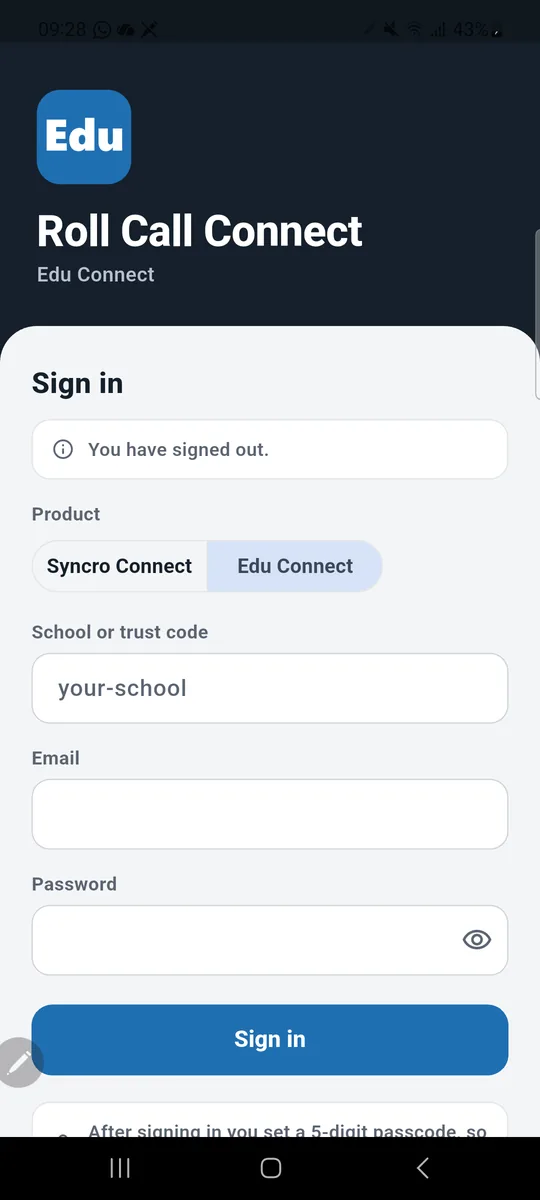
Roll Call Connect sign in screen with Edu Connect selected, asking for the school or trust code, email and password

Download Roll Call Connect

Free for iPhone and Android, listed in the stores as Syncro Connect Roll Call. Marshals choose Edu Connect, then sign in with your school or trust code and their usual Edu Connect details. After that the app opens with a passcode, fingerprint or face, ready in about a second.

Running a roll call for a business rather than a school? See our fire roll call system for workplaces.

What Edu Connect is not, and what is still on its way

So you can judge it properly, here is where Edu Connect stops, and what is being built but is not switched on today.

What it is not

  • Not an MIS, and not your attendance register. Statutory attendance stays in your MIS. Edu Connect records who is on site, which is a different question.
  • Not a vetting system. It records who visited and when. It does not carry out DBS checks or keep your single central record, which remain your school’s responsibility under Keeping children safe in education.
  • Not staff time and attendance. It does not calculate staff hours or export to payroll. For that, see our workforce systems for schools.

On its way

  • MIS sync with Arbor and others. Edu Connect is built to sync pupils, staff, tutor groups, photos, card numbers and leavers from your MIS. It is in development and not switched on today.
  • Printed visitor badges with photos. Visitors are photographed at sign-in today. Printed badges are coming.
  • Phone scanning with Scanner Connect. Part of the same family of apps, but not yet linked to Edu Connect.

The apps and hardware

Card readers, reception kiosks and apps all feed the same system, so every sign-in lands on one list.

Part What it does Who uses it Status
Edu Connect The system itself: who is on site, visitors, activity registers, room booking and the event log, across every school in the trust Office, safeguarding, trust IT and estates teams Available now
Card readers Staff and pupils tap their card to sign in and out Staff and pupils Available now
Visitor Connect Reception kiosk app for visitor sign-in with a photo, pre-registered visitors and event QR codes Visitors and reception teams Available now
Roll Call Connect Live fire roll call on marshals’ phones, worked by several marshals at once Fire marshals Available now
Scanner Connect Scanning on a phone Staff on the move Not yet linked to Edu Connect

Pupil data, hosting and security

Edu Connect holds information about children, so here is exactly where it lives and who is responsible for what.

Where the data is heldIn the UK. The Edu Connect database and web servers are hosted in the UK.
Who can get inEvery person who signs in to the Edu Connect website uses two-step sign-in, not a password alone.
Who is responsibleYour school or trust is the data controller for the people it records, and Computime processes that data on your behalf. Edu Connect gives you the records and the controls. Meeting UK GDPR is something your school does with them, and the ICO’s guidance on controllers and processors sets out who does what.
Data processing agreementA data processing agreement for schools, under Article 28 of UK GDPR, is being finalised. Ask us and we will send it to you as soon as it is ready.
Privacy policyEdu Connect has its own privacy policy, written for schools, at edu-connect.co.uk/privacy-policy.

Want an early look at Edu Connect?

We have been shaping Edu Connect with a multi-academy trust. We are now looking for a small number of schools and trusts who would like an early look, and a say in what comes next.

We have not published prices yet. Get in touch, ask for Nicholas Pearson, and we will show you how it would work across your schools.

Questions schools ask about Edu Connect

Does Edu Connect replace our MIS attendance register?

No. Statutory attendance stays in your MIS. Edu Connect answers a different question, which is who is on site right now, including staff, visitors, and pupils at clubs or moving between schools in the trust.

Does Edu Connect work with Arbor?

It is built to sync with Arbor and other MIS, but that sync is in development and not switched on today. When it is, pupils, staff, tutor groups, photos, card numbers and leavers will be kept up to date from your MIS without extra admin. Ask us how people are set up in Edu Connect in the meantime.

What happens when a sixth former signs in at another school in our trust?

They show on that school’s list of who is on site, and Edu Connect emails their home school automatically. The same card works at every school in the trust, so there is no second card to issue.

Can several fire marshals work the same roll call at once?

Yes. Each marshal opens Roll Call Connect on their own phone and works the same live list, tapping Safe as people are found, and everyone’s progress updates together. It supports your fire procedures rather than replacing them: your duties under the Regulatory Reform (Fire Safety) Order 2005, your fire risk assessment and your drills stay with your school.

Does the fire roll call include visitors and pupils at after-school clubs?

It includes everyone signed in at that school when the alarm sounds: staff, pupils and visitors. Taking a club register does not change whether someone shows as on site, so a pupil still signed in at a club is on the roll call list. Someone who left without signing out will also still show as on site until they are found or their record is corrected.

Can visitors sign out without coming back to reception?

Yes. Visitors are given a QR code when they sign in, and can sign out by scanning it. Expected visitors can also be pre-registered, so they are not filling in details at the desk.

Does Edu Connect print visitor badges?

Not yet. Visitors are photographed when they sign in at the kiosk today, and printed badges with photos are coming. We would rather tell you that now than have you find out at installation.

Does Edu Connect carry out DBS checks or keep our single central record?

No. Edu Connect records who visited and when, but vetting and the single central record remain your school’s responsibility under Keeping children safe in education. Be wary of any sign-in system that suggests otherwise.

Where is pupil data stored, and who is responsible for it?

The Edu Connect database and web servers are hosted in the UK, and every website user signs in with two-step sign-in. Your school or trust is the data controller and Computime processes the data on your behalf. A data processing agreement for schools is being finalised, and we will send it to you as soon as it is ready.

Can we use Edu Connect for school trips?

Yes, by running the trip as an activity register, taken by QR code, card or PIN, or ticked by the trip leader. There is nothing trip-specific beyond that, so consent forms and payments stay in whatever system you use for them now.

How much does Edu Connect cost?

We have not published prices yet. We are working with a small number of early schools and trusts, so get in touch and we will talk you through it for your schools.

Who makes Edu Connect?

Computime, a UK software house in Leeds that has built sign-in and workforce systems since 1989. Edu Connect is its own product, built on the same platform as our Syncro Connect workforce system, and shaped with a multi-academy trust.

Another question? Ask us directly, or call 0113 350 9043.

Left Menu Icon
