The basics

What is swipe card clocking?

Swipe card clocking is a way for staff to record their hours by tapping or swiping a card or fob on a reader. Each card is linked to an employee, so when they clock in or out the terminal records exactly who clocked and when, and sends it to your time and attendance system automatically. It is quick, hard to fake, and needs no phones or PIN codes, which makes it a popular choice for factories, warehouses, and sites where a simple, robust method works best.

Flash and go RFID clocking

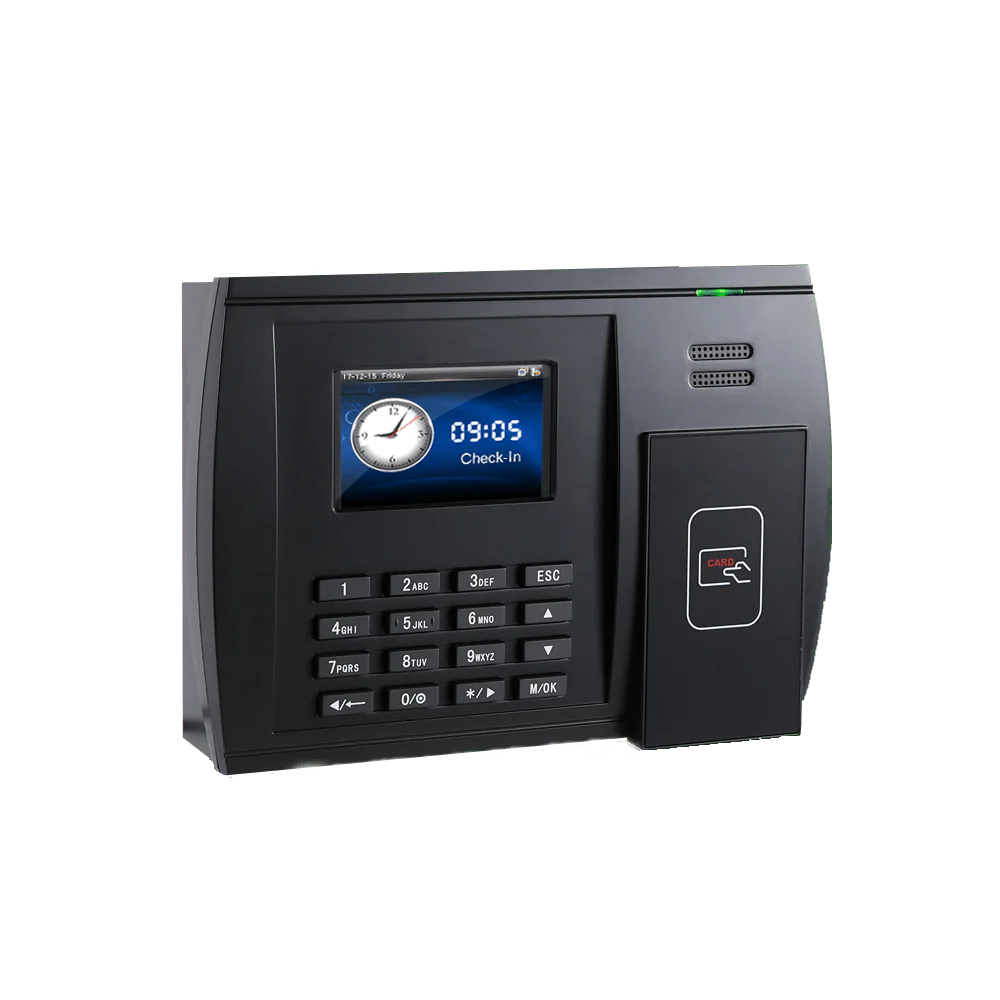
Computime’s IP-enabled swipe card clocking machines give small businesses a fast, accurate way to capture time and attendance data. Each terminal has a flash and go RFID reader built for speed, so employees clock in and out simply by waving their card or fob in front of the unit.

Because there is no physical contact between the card or fob and the reader, neither wears out with continuous use, and the terminal is not affected by dust or residue from the working environment. That makes swipe and RFID clocking a durable, low-maintenance choice for busy sites, workshops, and factory floors.

Key benefits

Multiple technologies

The proximity reader supports RFID EM cards and fobs, with optional Mifare or HID.

Fast clock-in speed

A flash and go reader means staff clock in and out in an instant, with no queues at the start of a shift.

Touch free

Contactless clocking supports a cleaner, more hygienic working environment.

Large storage

During an internet outage staff can still clock in. The unit stores up to 200,000 records.

Where swipe card clocking works best

A card or fob is a practical fit wherever staff clock in at a fixed point.

Factories and workshops

A robust terminal at the entrance handles high volumes of staff quickly at shift changeover.

Warehouses and logistics

Fast, contactless clocking for large teams, with the same card controlling door access.

Sites without phones on the floor

Where personal phones are not practical or allowed, a card gives staff a simple way to clock in.

Offices and mixed sites

One card for clocking and door entry, with the app as an option for hybrid staff.

Technical specification

RFID EM reader, with optional Mifare or HID
Stores up to 200,000 log records on the unit
Audible and visual indicator to confirm each clocking
Real-time communication with PUSH technology
IP-enabled ethernet, 10/100Mb
Optional WiFi communication
Power over Ethernet option available

Why choose Computime?

For 30+ years since 1989 we have helped UK businesses take control of their workforce, and we supply and support the time and attendance hardware to go with it.

Your clocking terminals, software, and payroll export come from one supplier, built and supported by a dedicated Leeds team. When you contact us you speak to someone in Leeds, not an overseas call centre.

800+

UK businesses trust Computime systems

30+

years of UK workforce experience since 1989

4.5

average rating on Google from UK customers

UK

based support team on hand when you need them

Swipe card clocking FAQs

How does swipe card clocking work?
Each employee has a card or fob linked to their record. They tap or swipe it on the reader to clock in and out, and the terminal records who clocked and when, sending the data to your time and attendance system automatically.
Can one card handle both clocking and door access?
Yes. The same card or fob can clock staff in and out and control entry through doors, so you manage clocking and access control from one system and one card.
What happens if the internet goes down?
Staff can still clock in. The terminal stores up to 200,000 records on the unit, so clockings are held safely during an outage and sync automatically once the connection is back.
What card types does the reader support?
The terminal uses an RFID EM proximity reader as standard, with optional Mifare or HID support. Staff clock by holding a card or fob near the reader, with no physical contact, so nothing wears out with use.
Can we use cards and the mobile app together?
Yes. Some staff can clock with a card at a terminal while others clock from their phone with the Syncro Connect app. It is a good fit for sites with both on-site and mobile teams.
Do the hours flow through to payroll?
Yes. Approved hours flow into payroll with direct Sage Payroll integration and export for Pegasus and QuickBooks, so there is no manual re-keying.

Start A Conversation

Left Menu Icon