The basics

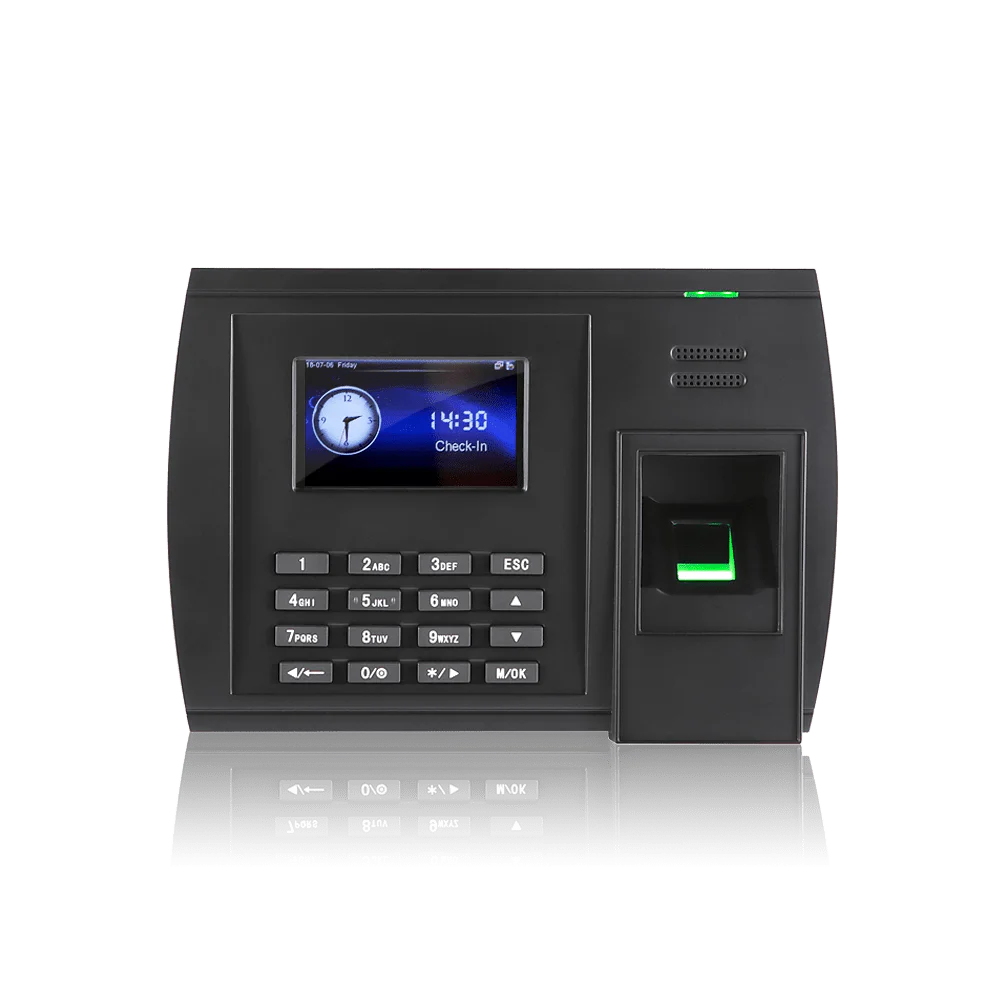
What is a fingerprint clocking machine?

A terminal that records hours when somebody puts a finger on the reader. It matches the scan against their enrolled record, accepts the clocking and sends it to your time and attendance system. The whole thing takes about a second, which is why it copes with a queue at seven in the morning.

Because the credential is the finger rather than a card, it cannot be handed to a colleague on the way in. That makes clocking in for somebody else far harder than it was, though no system makes it impossible and we would be wary of anyone claiming otherwise.

This page covers the machines: models, prices and what they cope with. For how the technology works, what gets stored and what UK GDPR asks of you, see biometric fingerprint.

Why sites choose a fingerprint reader

The credential cannot be lent

A card gets handed over on the way in. A finger does not, which makes clocking in for somebody else far harder than it used to be.

Nothing to issue or chase

No cards to print, no fobs to replace on a Monday morning, and nothing to get back from somebody who has already left.

Enrol from the office

A USB enroller means HR can set up a department at a time rather than queueing everybody at the terminal, which is the one thing fingerprint does better than face.

One reader, two jobs

The same terminal can release a door through access control, so entry and the clocking are one event.

How it behaves day to day

The terminal stores a mathematical template rather than an image of the fingerprint, and matches the live scan against it in about a second. Clockings are held on the unit and sync when the network returns, so a connection drop does not put anybody back on paper.

  • One touch, about a second, no card to find first
  • A template rather than an image, not designed to be turned back into one
  • Enrol more than one finger, so a cut thumb is not a problem
  • Also reads cards and PINs, for anyone who declines enrolment
  • Keeps recording through a network outage
  • Hours through to payroll without re-keying

The one thing to know before you buy: fingerprint readers struggle with hands that are wet, dusty, oily or worn smooth by manual work, and a small proportion of people simply have prints that scan poorly. In an office or a warehouse that rarely matters. On a bakery floor or a building site it matters a great deal, and facial recognition or palm is the better starting point.

Where a fingerprint reader is the right call

It is the simplest biometric to run and the quickest to enrol. It suits most workplaces, with one category of exception.

Offices and professional services

Clean hands, a manageable headcount and no appetite for issuing cards to people who will lose them.

Warehousing and distribution

Works well where people are handling boxes rather than materials that leave a residue, and one terminal takes a whole shift quickly.

Businesses with high turnover

Central enrolment from the office and nothing to issue or collect back in, which is the administration that accumulates when people come and go.

Some staff on site, some not

A terminal at the door and the app for anyone who is not, both on one timesheet.

The exception is hands. Food production, construction, engineering and workshops all produce the wet, dusty or worn fingertips that fingerprint readers struggle with by mid-morning, and those sites do better on facial recognition or palm. If you are not sure which side of that line you fall, ask us.

Why choose Computime?

For over 35 years, since 1989, we have supplied both the terminals and the software behind them. That matters when a reader stops working: one phone call rather than a manufacturer, a reseller and an installer each suggesting it is one of the others.

It also means we have no reason to push you towards one credential over another. If fingerprint is the wrong answer for your site, we will tell you before you buy rather than after.

Built and supported by our own team in Leeds. When you call, you speak to someone here.

800+

UK businesses trust Computime systems

35+

years of UK workforce experience since 1989

4.5

average from 41 Google reviews

£495

fingerprint terminals from, excl. VAT

Fingerprint clocking machine FAQs

The hardware questions. For consent, DPIAs and what is stored, see biometric fingerprint. Or call the Leeds team on 0113 350 9043.

How much does a fingerprint clocking machine cost?
From £495 excluding VAT as a one off, with larger terminals and dual credential models running higher. The software is separate at £2 per employee per month excl. VAT. Worth knowing that facial recognition starts lower, at £395, so fingerprint is not automatically the cheaper biometric. The pricing page has the full list and a calculator.
Whose fingerprints will not scan properly?
Anyone whose hands are regularly wet, dusty, oily or covered in plaster, and anyone whose prints have worn smooth through manual work. Bricklayers, bakers, mechanics and cleaners are the usual examples, and a small proportion of people have prints that read poorly for no obvious reason. If that describes a fair part of your workforce, start with facial recognition or palm rather than discovering it in week two.
How many terminals will we need?
It depends on entrances and on how many people arrive at the same moment rather than on headcount. A hundred staff arriving over an hour manage on one. A hundred arriving for a six o’clock start will queue. Tell us what your mornings look like and we will say what you need.
How many fingers should we enrol?
Two, one on each hand. A cut, a dressing or a hand in a splint then does not stop somebody clocking in, and it saves a call to us on the morning it happens. Enrolling a single finger works right up until the day it does not.
Can we enrol people without queueing at the terminal?
Yes, with a USB enroller, which is fingerprint’s main practical advantage over facial recognition. HR can enrol a department at a time from the office rather than standing at the door on a Monday morning. It takes under a minute a person.
What happens when somebody leaves?
You put a leave date against them in the software and the terminal clears their permission automatically. They cannot clock and they cannot open a door, without anyone walking round the site with a laptop. One thing to plan for separately: the biometric template itself stays on the terminal until it is purged, so removing old templates should be part of your data retention process rather than something you assume happened with the leave date.
Does it store our staff’s fingerprints?
It stores a template, which is a set of measurements taken from the distinctive points of the scan rather than a picture of the finger, and it is not designed to be turned back into one. It is still biometric data and still special category data under UK GDPR, so it is treated accordingly. Our data security page sets out where it sits.
What happens if the network goes down?
The terminal holds its own templates and records clockings locally, syncing when the connection returns, so a network fault does not mean a morning of paper.
Can the same machine open doors?
Yes. The same terminal can clock somebody in and release the door through access control, so entry and attendance are one event and one enrolment. Break glass units are fitted as standard so anybody can get out by hand, and doors can also be released automatically on the fire alarm where your alarm panel is interfaced to the door hardware, which is agreed at survey.
Can it take cards or PINs as well?
Yes, and you will want it to. Somebody who declines biometric enrolment needs a way to clock that does not single them out, and a visitor or contractor will not be enrolled at all. Mixed use at one terminal is normal rather than a workaround.
How long does installation take?
A terminal is usually a morning, including power and network. Power over Ethernet often saves running a separate supply to the door, which is worth asking about if the location is awkward. Syncro Connect itself runs in days.
Start A Conversation

Left Menu Icon
