Guides on this page
1 Adding a day manually in the Clocking Hub ▼
Add a missing day for an employee who has not clocked in or out, where no data came from the clock and no absence was generated, for example because they were not expected in or are on an open schedule.
Step 1: Open the Clocking Hub
- On the left-hand menu, click Clocking Hub.
- In the top right corner, click the green plus box. A pop-up window appears.
Step 2: Enter the day’s details
- Select the employee.
- Select the dates you want to add the time for.
- To use the employee’s standard schedule, leave Use Employee Schedule ticked. To put them on a different shift temporarily, untick it and choose another shift from the drop-down.
- Enter their paid in hours and paid out hours.
Step 3: Create the day
- Click Create Day.
The time is added to the Clocking Hub and appears on your timesheets and other time and attendance reports.
2 Correcting a clocking time ▼
Add a missing time, correct an existing one, or fill in a day with no clocking data at all. Find the record using the date range and filters, then add or edit the times on the employee’s record.
Step 1: Find the records
- On the left-hand menu, click Clocking Hub.
- Use the orange box in the top left to select your date range.
- Use the Filters button on the right to filter by site, department, job title, employee and so on.
- You will see a list of names with their shift times, clock in and clock out information.
Step 2: Open the record to edit
- Find the employee whose record needs amending, and click More on the right-hand side of their name.
- A panel slides in from the right. Click the Times tab.
Step 3: Enter the time and update
- Enter the time manually in the Paid Out column.
- Click Update.
The Actual In and Actual Out times do not change when you amend the paid columns. They stay as the physical record of what the clock captured, or of a missed clocking, so your audit trail is preserved.
3 Recalculating hours for multiple dates ▼
Recalculate hours across a date range in one go, for all employees or specific ones, so everything is worked out correctly against the right shift.
Step 1: Open the Clocking Hub tools
- On the left-hand menu, select Clocking Hub.
- On the right of the screen you will see three orange squares. Select the middle one, with the spanner icon, for the Clocking Hub tools.
- Choose Recalculate Range from the pop-out. A side window appears.
Step 2: Set the range and filters
- Select the date range you want to recalculate, for example this week.
- Choose whether to include all shifts and schedules, or specific ones.
- Choose all employees, or specific employees.
Step 3: Run the recalculation
- Click the green Recalculate button and confirm.
- The recalculation runs, and all hours are recalculated against the corresponding shift.
4 Seeing who changed a clocking, and what changed ▼
Every manual change to a clocking is logged. You can see at a glance which records were edited, then open the activity log to see who changed it, what it was before, and what it is now.
Step 1: Spot an edited clocking
- On the left-hand menu, select Clocking Hub.
- Find the clocking data you want to check.
- If a clocking has been manually adjusted by anyone, an orange circle with a pencil appears on the Actual In or Actual Out time, showing a change was made.
Step 2: Open the activity log
- Select the speech bubble with the number above it.
- The activity log opens, showing exactly who changed it, what it was before and what it is now, with a date and time stamp.
You can view this history for any change made anywhere in the Clocking Hub, so there is always a full audit trail of who adjusted what.
5 Clearing an exception flagged in error ▼
Sometimes an exception is flagged when the employee was genuinely working, for example they went straight to a customer site or an offsite meeting and could not clock in on time. Because they clocked in late at the machine, the system flags a lateness exception. This guide clears it, so it does not count against their punctuality.
Step 1: Find the record
- Go to Clocking Hub and select the date range.
- Find the line of data for the employee, then click More.
Step 2: Correct the time
- On the Times tab, change the clock-in time to the correct one, for example from 10:30 back to 9:00.
- This sorts out the pay side, so they are paid from their proper start time.
Step 3: Remove the exception
- Click the Exceptions tab. You will see the exceptions flagged on this record.
- Find the lateness exception and click the bin icon to remove it.
- Click Update.
Correcting the time handles their pay, and removing the exception means the lateness does not go against them in future punctuality reports.
6 Correcting a missing clock-out ▼
When an employee forgets to clock out, add their paid finish time by hand in the Clocking Hub. You enter it in Paid Out; Actual Out stays blank because no physical clock-out was recorded.
Step 1: Open the Clocking Hub
- Select Clocking Hub from the main menu.
- Choose the relevant date, then find the employee. Use the search box to find a particular person or payroll number.
Step 2: Open the clock card
- Find the row with the missing clock-out and click More on the right.
- A missing clock-out shows as –:– in the Actual Out and Paid Out columns.
Step 3: Enter the paid finish time
- On the Edit tab, open Times.
- Enter the correct finish time in the blank Paid Out field.
Actual Out is read-only and stays –:–, that is correct, because there was no physical clock-out. Do not use Add Segment unless the employee genuinely worked a separate additional period.
Step 4: Save
- Click Update. Syncro Connect saves the Paid Out time and recalculates the paid hours.
- Check the updated Paid Out and Total Pay values before leaving the record.
7 Reading the Clocking Hub ▼
The Clocking Hub shows every clocking session for the dates you choose. Knowing what each column and icon means makes it quicker to spot problems and get days approved for payroll.
Where to find it: Time and Attendance, then Clocking Hub on the left-hand menu.
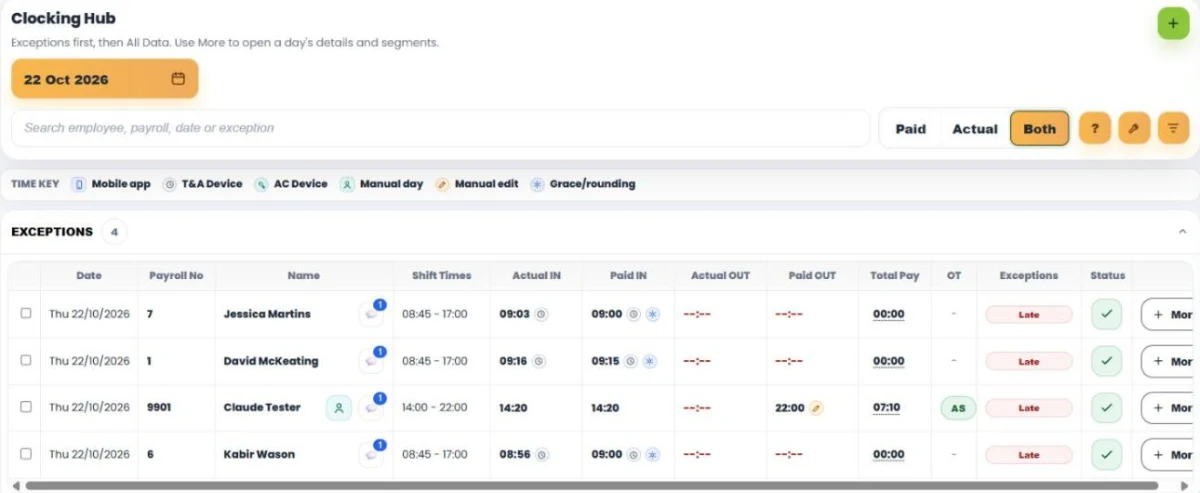
Choose the dates and people
- Click the orange date button to choose a date or range.
- Use the search box to find an employee name, payroll number, shift or exception.
- Click the filter button to narrow the list by employee, department, site, job title, payroll group, assembly point or access level, as well as work pattern, clocking method, and exceptions and pay flags. Click Apply.
Exceptions and All Data
- Exceptions: sessions waiting for approval. These are shown first.
- All Data: every other session. The count in each heading follows your filters.
Paid, Actual or Both
- Paid: the times used to work out pay, after any grace or rounding rules.
- Actual: the times the person really clocked.
- Both: all four time columns side by side.
Reading the columns
Click any column heading to sort by it.
- Speech bubble by the name: opens the activity log for that session.
- Total Pay: click it to see the pay breakdown and the pay rules used.
- OT: shows whether overtime was earned. Click it to see the rate and hours.
- Exceptions: click an exception to see what it means. If a day has more than one, the first is shown with +N beside it.
- –:– means no time has been recorded.
The time icons
The time key above the list explains the small icon next to each time:
- Mobile app: clocked on the app. Click it to see the location on a map.
- T&A Device or AC Device: clocked on a terminal or access control reader. Click to see which one.
- Manual day: the day was created by hand. Click to see who added it and when.
- Manual edit: a manager added or changed the time.
- Grace/rounding: the paid time differs from the clocked time because of grace or rounding rules. Hover over it to see the real clock time.
Common exceptions
- No Clock In or No Clock Out: a clocking is missing.
- No Shift: the person clocked but has no shift for that day, so no hours can be paid until one is assigned.
- Absent: no clocking on an expected working day.
- Late or Early Finish: outside the shift start or finish.
- Under Target: on an open shift, the paid time is below the expected hours.
Approving a day
- Click the tick in the Status column to approve a session and move it to All Data. The same button moves it back.
- To approve several at once, tick the boxes at the start of each row.
- Corrections are never made in the list itself. Click More on the row to open the session and change it.
Grace rules can pay someone from their shift start and still show them as Late. That is expected: grace covers the pay, but the lateness is still recorded.

