800+

UK businesses use Computime

35+

years, since 1989

Looking to log in?

Already use Syncro Connect or Computime at work? This is where to sign in.

  • Syncro Connect: log in at syncroconnect.com, or open the Syncro Connect app
  • Realtime employee portal: your company has its own address, so ask your manager for it
  • Still stuck? Call the Leeds team on 0113 350 9043

What is Syncro Connect?

Syncro Connect is cloud based time and attendance software from Computime Systems (UK) Ltd in Leeds. It records when staff start and finish, from a clocking terminal, a web browser or the Syncro Connect app, works out hours against your shift and overtime rules, and exports approved hours to payroll.

It is also the base for the Connect family: absence, HR, flexitime, fire roll call, visitor sign in and door access, each added as a module on the same employee records. Syncro Connect is not related to Syncro, the IT management software used by managed service providers.

See it working with your own staffFree trial with no card needed, or book a demo with our Leeds team.

The core: time and attendance

Every Syncro Connect account starts here. Clockings come in from wherever your people work and become timesheets without anyone typing them up. This is the Syncro side of time and attendance at Computime.

Web software

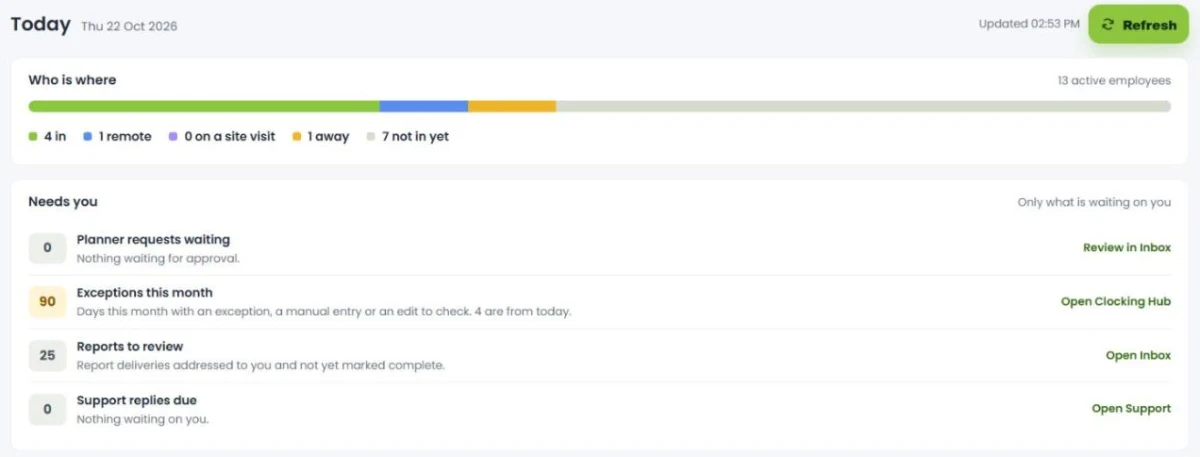
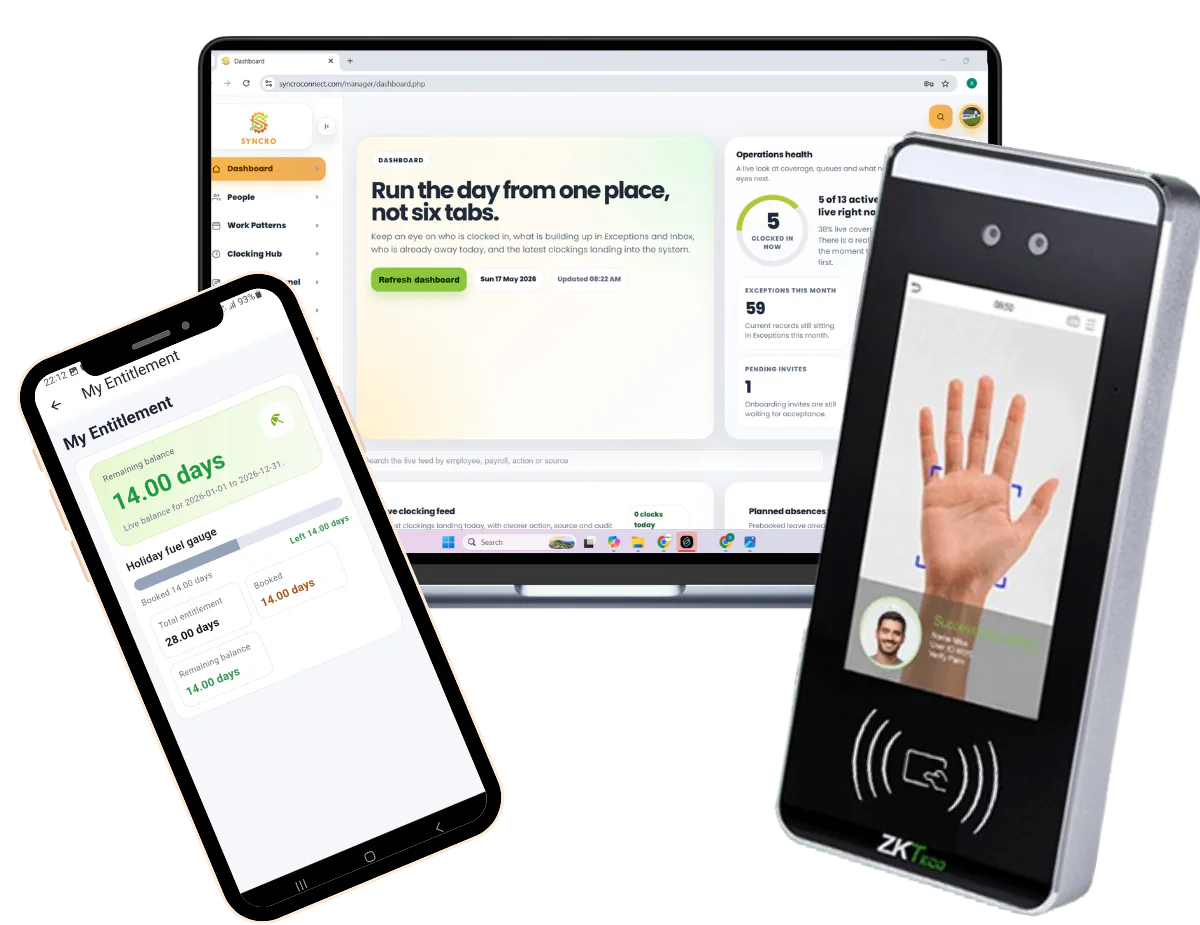
Who is in right now, timesheets built from clockings, and your shift patterns, rounding, breaks and overtime rules set up by us. Multi-site and department views, with approved hours exported to payroll.

Syncro Connect Attendance Software

The Syncro Connect app

Staff clock in on their own iOS or Android phone, with GPS location recorded at the moment of clocking. It works offline and syncs later, and staff can request holiday, check balances, see timesheets and mark themselves as travelling.

Syncro Connect Attendance App

Clocking terminals

Facial recognition and palm terminals from £395, fingerprint from £495, one-off and excl. VAT. Supplied configured, and supported from Leeds. Not needed at all if everyone uses the app.

Clocking hardware

Notifications

Managers get a push notification when a holiday request needs approving or a clocking needs attention, such as a late or missed clocking, and approve from their phone.

Add the Connect modules you need

Each module plugs into Syncro Connect and uses the same staff and the same records, so nothing is entered twice. Start with time and attendance and add the rest when you are ready.

Your people

Leave Connect

Holiday, sickness and return to work, with live balances, Bradford Factor scores and sickness spells in the payroll export.

Included in the software. Staff self-service with the app.

HR Connect

Employee records, documents, contracts and appraisals, kept alongside clocking and absence.

£1 per employee per month

Syncro Flexi

Flexitime balances worked out from actual clockings, with flexi leave requested and approved in the app.

Included in the software. Staff self-service with the app.

Syncro Kiosk

A shared tablet where staff without a smartphone use self-service, signing in with their clock number and PIN.

Part of the app plan. You supply the tablet.

Your site

Fire Connect

A live roll call on marshals’ phones, with everyone who clocked in, signed in or badged through a door on the list.

£395 a year

Visitor Connect

Visitors sign in by QR code or at a tablet, their host is notified and a badge prints.

£495 a year

Access Connect

Doors opened by card, fob, PIN or biometric, installed by our engineers and run from the same records.

£395 a year, plus hardware and installation quoted

Running a school or trust? Edu Connect is the Connect family set up for education.

What Syncro Connect costs

Prices are per employee per month for the system, and a flat yearly fee for the site modules. There are no setup fees.

A 50 person business with everyone on the app pays £150 a month excl. VAT. Add Fire Connect and it is another £395 a year, whatever the headcount.

Billed annually, with monthly billing also available. All prices exclude VAT. The pricing page has worked examples.

Syncro Connect prices, excluding VAT
Syncro Connect software £2 per employee per month
Time and attendance in the web software, with Leave Connect and Syncro Flexi management included
Syncro Connect app £3 per employee per month in total
Adds the app, GPS clocking, staff self-service and Syncro Kiosk
HR Connect +£1 per employee per month
Employee records, documents and appraisals
Fire Connect £395 a year
Flat, whatever your headcount
Visitor Connect £495 a year
Flat, whatever your headcount
Access Connect £395 a year
Plus readers, locks and installation, quoted after a site survey
Clocking terminals From £395 one-off
Facial recognition and palm from £395, fingerprint from £495

Cloud software from a company that answers the phone

Plenty of cloud workforce platforms sign you up in five minutes and leave you to it. With Syncro Connect, our Leeds team is on the phone to help you get your shifts and pay rules right, and stays there afterwards.

Syncro Connect has no minimum or maximum headcount. Your data is held in the UK, with access logged and restricted to named users. Our data security page explains how.


  1. Day one

    You have access straight away, and staff can be imported from a spreadsheet.


  2. First two weeks from payment

    You set up your shifts and pay rules, with our Leeds team on hand to help.


  3. First payroll

    We run your first payroll export with you. Running your old system alongside for a pay period is optional.


  4. After go live

    Support from the same Leeds team, by phone and email.

Download the Syncro Connect app

Free to download on iOS and Android. Staff sign in with the details their employer sets up in Syncro Connect.

Scan a code with your phone camera, or tap it on your phone.

Syncro Connect in action

See how Syncro Connect helps you

Clocking in comes first. Then add the Connect modules you need, all working from the same staff list.

  • Book and approve holiday with Leave Connect
  • Keep staff records with HR Connect
  • Run a live fire roll call with Fire Connect
  • Sign visitors in with Visitor Connect
  • Control doors with Access Connect
  • Self-service on a shared tablet with Syncro Kiosk

Syncro Connect FAQs

The questions we get asked most about Syncro Connect. If yours is not here, call the Leeds team on 0113 350 9043.

What is Syncro Connect?
Syncro Connect is cloud based time and attendance software from Computime Systems (UK) Ltd, a Leeds company trading since 1989. Staff clock in from a terminal, a web browser or the Syncro Connect app, the software works out hours against your rules, and approved hours are exported to payroll. Absence, HR, flexitime, fire roll call, visitor sign in and door access are added as Connect modules on the same records.
Is Syncro Connect the same as Syncro, the IT management software?
No. Syncro Connect is workforce software for recording staff hours and attendance, made by Computime in Leeds. Syncro is a separate product for IT managed service providers, from a different company, and the two are not connected.
What does Syncro Connect cost?
£2 per employee per month for the web software, or £3 in total with the Syncro Connect app, excl. VAT. HR Connect adds £1 per employee per month. Fire Connect is £395 a year, Visitor Connect £495 a year, and Access Connect £395 a year plus hardware and installation quoted per site. There are no setup fees, and prices are for annual billing, and monthly billing is also available. The pricing page has worked examples.
Which Connect modules do I need?
Most businesses start with time and attendance and Leave Connect, which is included in the software. Add HR Connect for employee records and documents, Fire Connect if you need a roll call in an evacuation, Visitor Connect for reception, and Access Connect for doors. Tell us how you work and we will say what you do not need as well as what you do.
Can we add modules later?
Yes, and most customers do. Each module uses the same employee records, so adding one later does not mean setting staff up again. Fire Connect, for example, picks up everyone already clocking in.
How quickly can we go live?
You have access from day one, and staff can be imported from a spreadsheet. Completing your rules and checking the data usually takes about two weeks from payment, with our Leeds team on hand to help. We run your first payroll export with you, and running your old system alongside for a pay period is optional. A free trial lets you see your first clocking within minutes.
Where is our data stored?
In the UK, with access logged and restricted to named users. You remain the data controller for your staff data under UK GDPR, so the software gives you the records and controls rather than making you compliant by itself. Our data security page explains how it is held.
Do staff need work phones to use the app?
No. The Syncro Connect app runs on personal iOS and Android phones, which is how most customers use it. Staff who would rather not use their own phone can clock in at a terminal, in a web browser or at a Syncro Kiosk tablet instead, all feeding the same system.
What happens if there is no phone signal?
The app stores the clocking on the phone and uploads it when signal returns, so nothing is lost. Clocking terminals hold their data locally too, so a dropped connection does not stop people clocking in or out.
Does GPS track staff all day?
No. Location is recorded at the moment someone clocks in or out, not between those points, so it shows where a clocking was made rather than following anyone around. Location is personal data, so tell staff what is recorded and why. The ICO’s guidance on monitoring workers sets out what is expected.
Can it handle our shift patterns and overtime rules?
Yes, and our Leeds team will help you get them right. Rotating and split shifts, night rates, rounding, break deductions, overtime thresholds and multi-site rules are normal for us. If your rules change later, the system changes with them.
Which payroll software does it work with?
Syncro Connect exports approved hours in the layout your payroll expects, with exports set up and tested for Sage, Pegasus, QuickBooks, BrightPay, Xero, IRIS and ADP. It is an export rather than a direct link. Direct integration with Sage Payroll is a Realtime feature. Tell us which payroll you run and we will show you the export before you commit.
Does Syncro Connect do rotas?
Not yet. Rotas are coming to Syncro Connect later in 2026. Staff can already see their timesheets in the app, and the rota will appear there when it arrives. If you need rotas today, Realtime has them.
Should we choose Syncro Connect or Realtime?
Syncro Connect for most businesses: cloud software, running in days, with the app and the Connect modules. Realtime is our installed system, for organisations that need job costing, direct Sage Payroll integration or rotas today, or want the software on their own server. We will tell you honestly which fits. For the general trade-offs, read cloud vs installed workforce software.
How do I log in to Syncro Connect?
Log in at syncroconnect.com, or open the Syncro Connect app. If you use Realtime’s employee portal, your company has its own address, so ask your manager. Still stuck? Call the Leeds team on 0113 350 9043.
Can we try it before committing?
Yes. The free trial needs no card and gives you the web software, the app and Leave Connect. If you have complicated shift rules, a demo is usually more useful, because we can show the system handling your situation rather than a generic example.
Syncro Connect

See your first clocking today

Start a free trial with no card, or book a demo and we will show Syncro Connect handling your shifts, your sites and your payroll.

Left Menu Icon