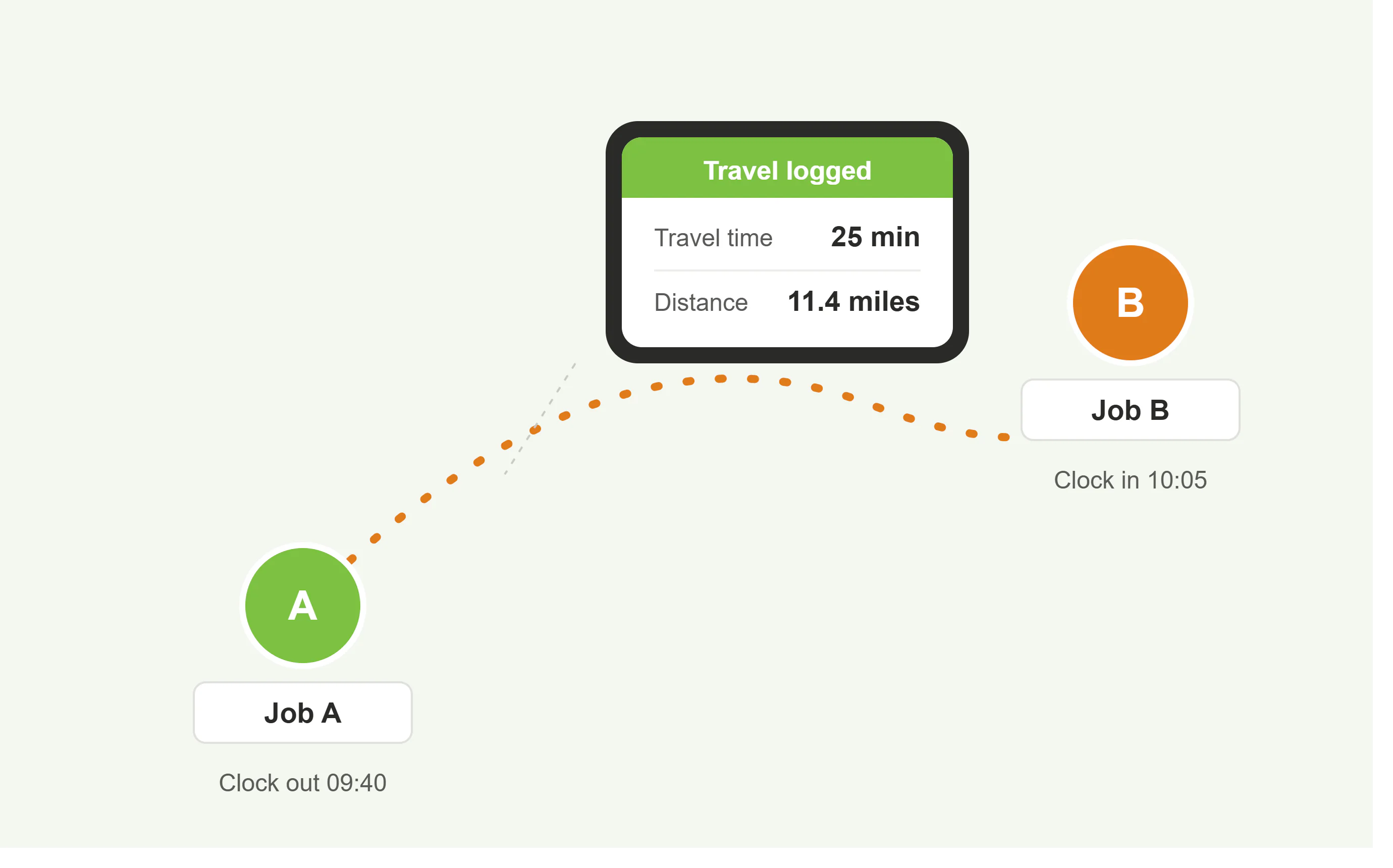
Capture travel time from the app

The Syncro Connect app works on iOS and Android and records travel time for your remote and mobile teams accurately, with the minimum of fuss. It also captures the location at each clock, so you have a verified record of where each job started and finished. For more on the location side, see GPS clocking.

Travel time recorded accurately between jobs
Staff clock in and out from their own phone
Distance and duration captured for each trip
Log travel against specific job or case numbers

Why recording travel time matters

For staff without a fixed workplace, time spent travelling between jobs can count as working time under the working time regulations. Getting that record right protects both your business and your staff.

Fair, accurate pay

Staff are paid correctly for the time they spend travelling between jobs, with no disputes over estimated hours.

Compliance and records

A clear, time-stamped record of travel supports working time and minimum wage compliance if you are ever asked to show it.

True cost of every job

Travel logged against job or case numbers shows the real labour cost of each job, not just the time on site.

One easy app for travel, staff, and payroll

Install the Syncro Connect app on any iOS or Android smartphone or tablet, and give your remote and mobile teams a simple way to record travel, clock in and out, and keep their records in one place, without paper logs or spreadsheets.

Record each employee’s travel time between jobs
Store individual travel records against each person
Log travel against specific jobs and projects
Feed clean data into your HR and payroll
Clock in and out from any location, on any device
See a clear picture of remote and mobile team travel

Travel reporting benefits

Accurate data

Have accurate travel and clocking information online whenever you need it.

Project recording

Allocate travel time by case or job reference for accurate costing.

Simple technology

Ready to use on any iOS or Android smartphone or tablet, with no fixed hardware.

Reliable

Data is held safely if a worker loses signal, then syncs when they are back online.

Simple to operate

An easy-to-use app that staff can pick up in minutes, with quick clocking in and out.

Who records travel time with Computime

If your team spends part of the day between jobs, this is built for you.

Field engineers and technicians

Record travel between call-outs and installations, logged against each job for accurate costing.

Care and support workers

Capture travel time between client visits, so domiciliary staff are paid fairly for time on the road.

Drivers and couriers

Keep a clear record of driving and delivery time across the working day.

Trades and site teams

Track travel between sites and jobs, and feed accurate hours straight into payroll.

Why choose Computime?

For 30+ years since 1989 we have helped UK businesses take control of their workforce, with accurate time and attendance for staff on site, on the road, and across multiple locations.

Travel time recording is part of the Syncro Connect app, built and supported by a dedicated Leeds team and backed by clean payroll export. When you contact us you speak to someone in Leeds, not an overseas call centre.

800+

UK businesses trust Computime systems

30+

years of UK workforce experience since 1989

4.5

average rating on Google from UK customers

UK

based support team on hand when you need them

Travel time FAQs

How do you record travel time between jobs?
Staff clock out at one job and clock in at the next using the Syncro Connect app on their phone. The time and distance between the two is captured automatically, giving you an accurate travel record with no paper mileage logs.
Is travel time counted as working time?
For staff without a fixed workplace, time spent travelling between jobs can count as working time under the working time regulations. The exact position depends on the circumstances, so it is worth taking advice, but an accurate record of travel makes it far easier to pay staff correctly and stay compliant.
Can travel time be logged against specific jobs?
Yes. Travel can be logged against specific job or case numbers, so you can see the true labour cost of each job, including time on the road, not just the time on site.
What devices does it work on?
It works on any iOS or Android smartphone or tablet, usually the employee’s own device. There is no fixed terminal to install, so staff can clock in and out from any job or site.
What happens if a worker loses signal?
The clocking is held safely on the device if a worker travels out of range or loses connection, then syncs automatically when they are back online. No travel records are lost.
Do travel hours flow through to payroll?
Yes. Approved travel and working hours flow into payroll with direct Sage Payroll integration and export for Pegasus and QuickBooks, so there is no manual re-keying.
Left Menu Icon