A Realtime feature

Job costing software: the hours that actually went into each job

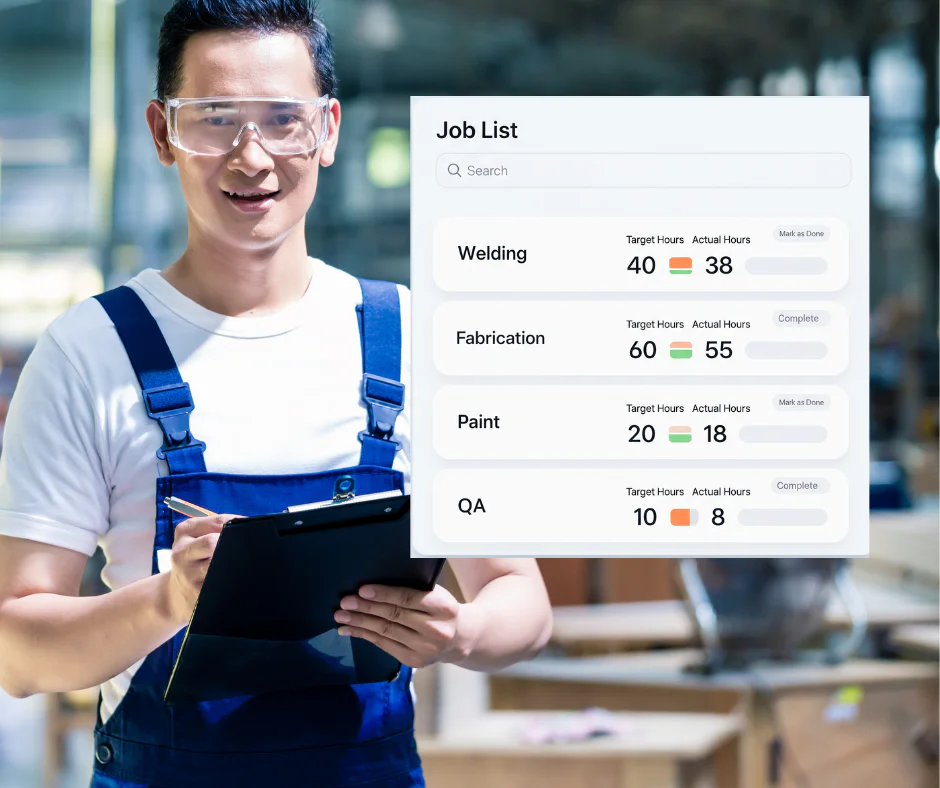
Most businesses know roughly what a job cost them. The estimate said four days, the invoice went out, and nobody checked. Job costing in Computime Realtime records the labour time against each job as it happens, so at the end you know how many hours went in and whose they were.

It comes from clockings rather than from a timesheet somebody reconstructs on a Friday afternoon, which is why the numbers are worth having. The same hours also feed payroll, so you are not maintaining two records of the same day’s work.

To be clear about scope: this costs labour time. It does not track materials, plant or overheads. If you need those too, you will want an accounting or project costing package alongside it, and we will say so rather than pretend otherwise.

  • Hours recorded against a job or case number as people work
  • See where an estimate and the actual hours parted company
  • Bill from recorded hours rather than from memory

Part of Computime Realtime · Not available in Syncro Connect · UK support since 1989

Computime Realtime job costing showing labour hours recorded against each job

Know where the hours went

What is job costing software?

Job costing software tracks what an individual job or project costs to deliver, so a business billing by job can tell afterwards whether the price it quoted covered the work it did. Depending on the system, that can cover labour, materials, plant and overheads.

Computime handles the labour part, and does it thoroughly. Hours are recorded against a job as people clock, drawn from your time and attendance rather than from a timesheet written up later, so the hours attributed to a job are the hours that were actually worked on it.

For most businesses that bill by the hour or price work by labour, that is the number that decides whether a job made money. If you also need materials and overheads costed, an accounting package handles that side and takes accurate hours from us.

The problems job costing solves

When labour hours are guessed rather than recorded, everything built on them is guesswork too: the invoice, the margin, and the price you quote next time.

Hours guessed, not measured

Paper timesheets and memory mean labour gets allocated to the job somebody remembers, not the job it was spent on. Every figure after that inherits the error.

Hours are clocked against the job as the work happens.

Nobody checks the estimate afterwards

The job was quoted at four days, it took six, and unless someone goes looking, that never gets noticed. The same job gets quoted at four days again next year.

The hours are there to compare against what you estimated.

Spreadsheet overload

Somebody spends Monday copying last week’s hours into a job sheet, and by the time it is finished it describes a week that has already gone.

Hours land against the job without anyone re-keying them.

Quoting the next job blind

Without a record of what similar work took, you are pricing from instinct. That hits hardest in construction and project-based trades, where one underquoted job can absorb the margin on three good ones.

Quote from the hours similar jobs actually took.

Why job costing matters

Jobs that lose money rarely announce themselves. They absorb a few more hours than quoted, get invoiced at the agreed price, and the difference disappears into the month. In thin-margin trades like construction, that gap is the whole margin.

8.5%

median profit margin for UK businesses, so a job running over by half a day matters more than it feels like it should

ONS, 2023

Construction

accounts for more UK company insolvencies than any other industry, year after year

Insolvency Service

Every hour

recorded against the job it was worked on, so the comparison with your estimate is there whenever you want it

Computime job costing

How job costing works

From clocking onto a job to knowing what it took, in four steps.

  1. Staff clock onto a job

    Rather than just clocking in for the day, people clock onto a specific job or activity, and move between them as the work changes.

    No paper, and no guessing afterwards who was on what.

  2. Hours land on the right job

    Time is allocated to the job and sub-code automatically as it is worked, rather than being divided up later by whoever fills in the sheet.

    Attributed while it is still fresh, which is to say correctly.

  3. See the hours mounting up

    Check a job part way through and see what it has taken so far, rather than finding out when the work is finished and the price is fixed.

    An overrun you can still do something about.

  4. Report and quote better

    Pull the hours by job, by person or by activity, and build up a history of what your work actually takes.

    Quote the next job from the last one, not from hope.

Key features

  • Works for onsite and offsite work, so hours are attributed wherever the job happens
  • Actual hours compared against the hours you planned, so overruns show up early
  • Breakdown by job, activity and sub-code, so you can see which part of the work absorbed the time
  • Hours by person where you need them, for allocating work rather than judging people
  • Reports you build yourself, and a history of what your work actually takes
  • Clocking onto a job takes seconds, because a system people find fiddly stops getting used

Key benefits

Work broken down properly

Jobs split into activities and sub-codes, so you can see which stage of the work took the time rather than only the total.

Reports you can act on

Hours by job, by activity or by person, compared against what you planned, built into reports you can run again whenever you need them.

Wherever the work happens

Clock onto a job at a terminal or in a browser, on site or away from it, so the record does not depend on someone being near a particular machine.

Price the next one better

A record of what similar jobs took, so quoting stops being a matter of remembering how the last one felt.

Who job costing is for

Any business whose price depends on how long the work takes, and where labour is the biggest part of the cost.

Construction

Hours attributed across sites and trades, so you know which part of a build absorbed the labour. See our construction time tracking.

Manufacturing

Labour allocated to production jobs and batches, so a run that took twice as long as planned is visible rather than absorbed. See our manufacturing solutions.

Engineering and installation

Jobs that run over rarely do so evenly. Hours by activity show whether it was the survey, the install or the return visit that cost you.

Professional services

Billable time recorded against client work as it happens, drawn from time and attendance rather than reconstructed at month end.

Why choose Computime?

For over 35 years, since 1989, we have helped UK businesses record what their staff actually work. Job costing is that same record, sorted by job rather than by person.

It is part of Realtime, which also gives you direct Sage Payroll integration, HR and document management, and the management portal. The hours behind a job and the hours behind a payslip are the same hours, entered once.

Built and supported by our own team in Leeds, with no minimum headcount and room to scale to 5,000 employees. When you call, you speak to someone here.

800+

UK businesses trust Computime systems

35+

years experience since 1989

4.5

average from 41 Google reviews

UK

based support team on hand when you need them

What our customers say

“

We are really pleased with our Computime solution. Introducing this system means that payroll is now processed accurately and efficiently, helping to boost morale both for our head office staff and our field teams. Real time data means we know where our employees are, allowing us to operate more efficiently.

James Dunlop

Financial Manager, Landworth Electrics

“

We are very pleased with the smooth implementation. Computime worked very hard to make sure installation was completed within the time frame and with minimum disruption. The in-depth training allowed us to focus on production and keeping our employees safe at work while ensuring efficiency.

Clare Barker

HR Manager, Wholebake Limited

“

I was tasked with sourcing a computerised time and attendance solution to replace our manual clocking system. The Computime website contained all the information I needed, making the decision straightforward. The software proved easy to use and the helpdesk was very helpful and friendly. Computime have exceeded all of our expectations and objectives. I would definitely recommend them.

Purchasing Manager

BSK Laminating

Job costing FAQs

What businesses ask before costing labour by job. If yours is not here, call the Leeds team on 0113 350 9043.

What is job costing software?
Job costing software works out what an individual job or project costs to deliver, so a business that prices work by the job can tell afterwards whether the price covered the work. Different systems cover different parts of that: labour, materials, plant, subcontractors, overheads. Computime covers the labour part, recording hours against each job as people clock rather than relying on a timesheet written up afterwards.
Does Computime track materials as well as labour?
No. We record labour time against jobs and nothing else: no materials, no plant hire, no subcontractor invoices, no overhead apportionment. If you need full job costing across all of those, you want an accounting or construction costing package, and it will do that better than we would. What we can do is feed it accurate hours, which is usually the part those systems handle worst because they depend on people filling in timesheets.
How is labour tracked against each job?
Staff clock onto a job rather than just clocking in for the day, and move between jobs as the work changes. The time accumulates against the job and its activity codes automatically, so at the end you have the hours that went into each stage rather than a total for the week that somebody divides up from memory on Friday afternoon.
Where do staff clock onto a job?
At a terminal. That makes job costing a good fit for a workshop, factory floor, depot or yard, where people are moving between jobs in the same building and pass a terminal as they change task. It is not the right tool for somebody driving between four customer sites in a day, because they are nowhere near a terminal when the job changes. Those teams are better served by the mobile app, which records their hours and travel time but does not allocate them to jobs. Worth establishing which of those you are before going further.
Is job costing available in Syncro Connect?
No. Job costing is a Realtime feature only. Syncro Connect, our cloud product, does not have it, and the two systems are entirely separate rather than two views of the same data. If costing labour by job is the reason you are looking, Realtime is the product to talk about, and we would rather tell you that now than after a demo of the wrong one.
How is this different from a timesheet app?
A timesheet app asks people to tell it where their time went. Job costing here starts from clockings, so the hours exist whether or not anyone remembers to allocate them, and the total against jobs reconciles with the total on the payslip. That reconciliation is the part timesheet apps struggle with: when the timesheet says 37 hours and payroll says 41, somebody has to work out which is right.
Does it tell us what a job cost in money?
No, it gives you hours rather than pounds. Realtime does not hold labour rates, so turning the hours into a cost happens in your accounting or costing system, where the rates already live. For most businesses that is the right place for it anyway, since rates change and you would not want them in two systems disagreeing with each other.
Can we see the hours before a job is finished?
Yes, and that is where most of the value is. Looking at a job halfway through and seeing it has already absorbed the hours you quoted for the whole thing is a different conversation from discovering it once the work is done and the price is fixed. You can compare against the hours you planned, though you set the plan; the system does not decide what a job should take.
Will staff actually clock onto jobs properly?
This is the question that decides whether job costing works, and it is worth being honest about. If clocking onto a job is fiddly, people batch it up at the end of the week and you are back to guesswork with extra steps. Keep the job list short, make the codes recognisable to the people using them, and explain that the point is pricing work properly rather than checking up on anyone. Businesses that skip that conversation tend to end up with data nobody trusts.
Can one person split time across several jobs in a day?
Yes. Someone moves from one job to the next by clocking onto it at the terminal, and the time is split at the point they switch rather than apportioned afterwards. That matters most for people who touch four or five jobs a day, where an even split across the day would be wrong for all of them.
Does it work with our accounting software?
The hours can be reported and exported, and Realtime integrates directly with Sage Payroll. Whether job hours flow into your accounting package’s own costing module depends on that package, so tell us what you run and we will be straight with you about what will and will not connect rather than promising integration in the abstract.
How much does job costing software cost?
Job costing comes as part of Realtime rather than being priced on its own, so what you are buying is the workforce system. Realtime is quoted per installation depending on headcount and what you need alongside it, and it can run on your own server or on our UK hosted platform. Tell us how many staff and how many jobs you are tracking and we will quote properly.
How long does it take to set up?
The software side is quick. The work is deciding your job structure: what counts as a job, which activities you want to break it into, and how granular is useful. Too coarse and the data tells you nothing; too fine and nobody keeps up with it. We have seen both, and we will help you land somewhere sensible before you go live.
Start A Conversation

Left Menu Icon
