HR reporting software that sits inside your time and attendance
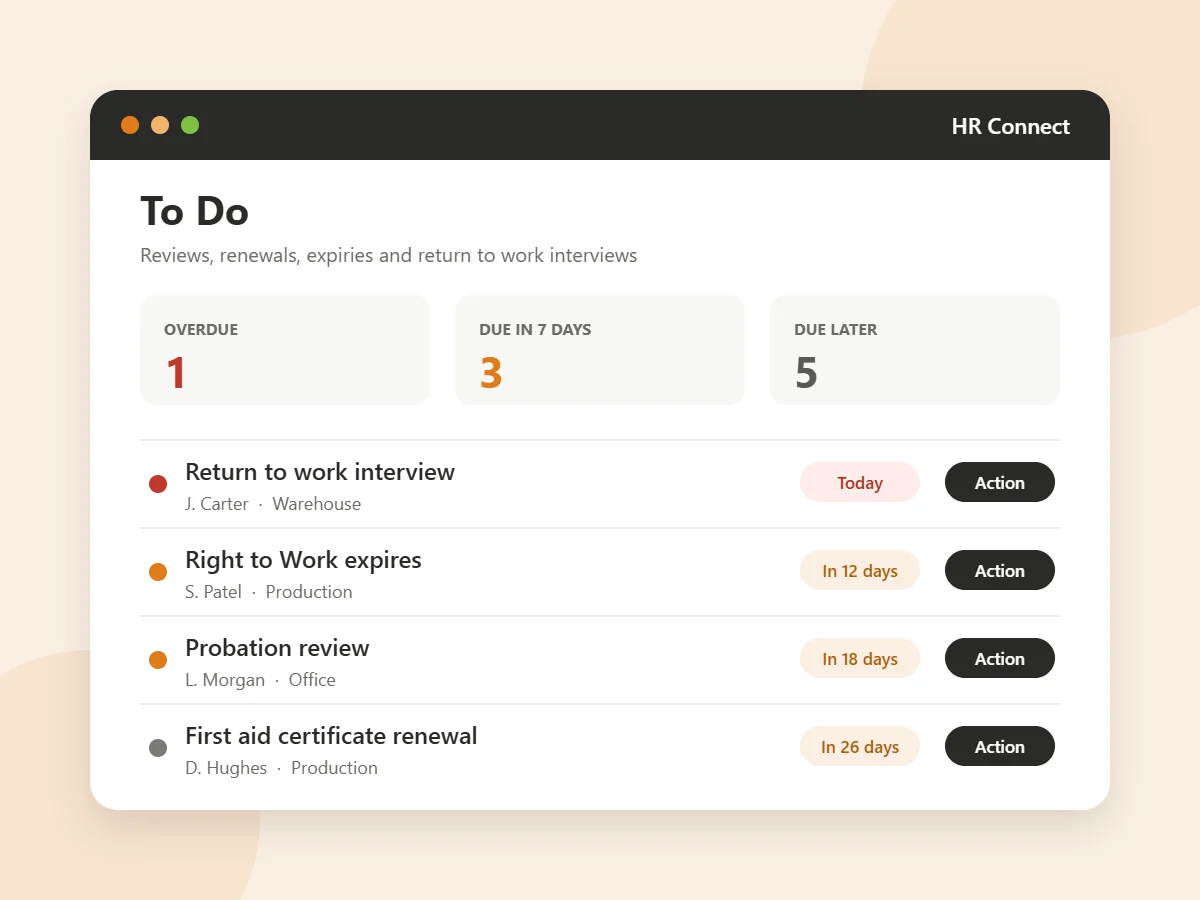
HR Connect adds employee records, documents, training, reviews, expenses and HR reports to Syncro Connect, for £1 per employee per month excl. VAT, billed annually. It works from the people and attendance data Syncro already holds, so nothing is typed in twice, and one To Do list tells each manager what is due.
Syncro Connect is £2 per employee per month, so time and attendance with HR comes to £3. Free for 14 days, with no card details needed.
Why HR records matter more than they used to
Absence is costly, sick pay rules changed in April 2026, and more of what employers owe staff now depends on records you can produce. These are the official figures.
- 148.8mworking days lost to sickness or injury in the UK in 2025Source: ONS, May 2026
- 40.1mworking days lost to work-related ill health and workplace injury in 2024/25Source: HSE
- Day oneStatutory Sick Pay is now paid from the first day of sickness, not the fourthSource: Acas
- 250+employees on the snapshot date means you must report your gender pay gapSource: GOV.UK
What HR Connect does
The people side of the business, kept next to the clocking and absence records you already have.
One To Do list
Every probation end, pay review, appraisal, expiring document, training renewal, driving licence check and return to work interview due in the next 30 days, for the people each manager looks after. Click a task and the right record opens with the form ready.
An HR record for every person
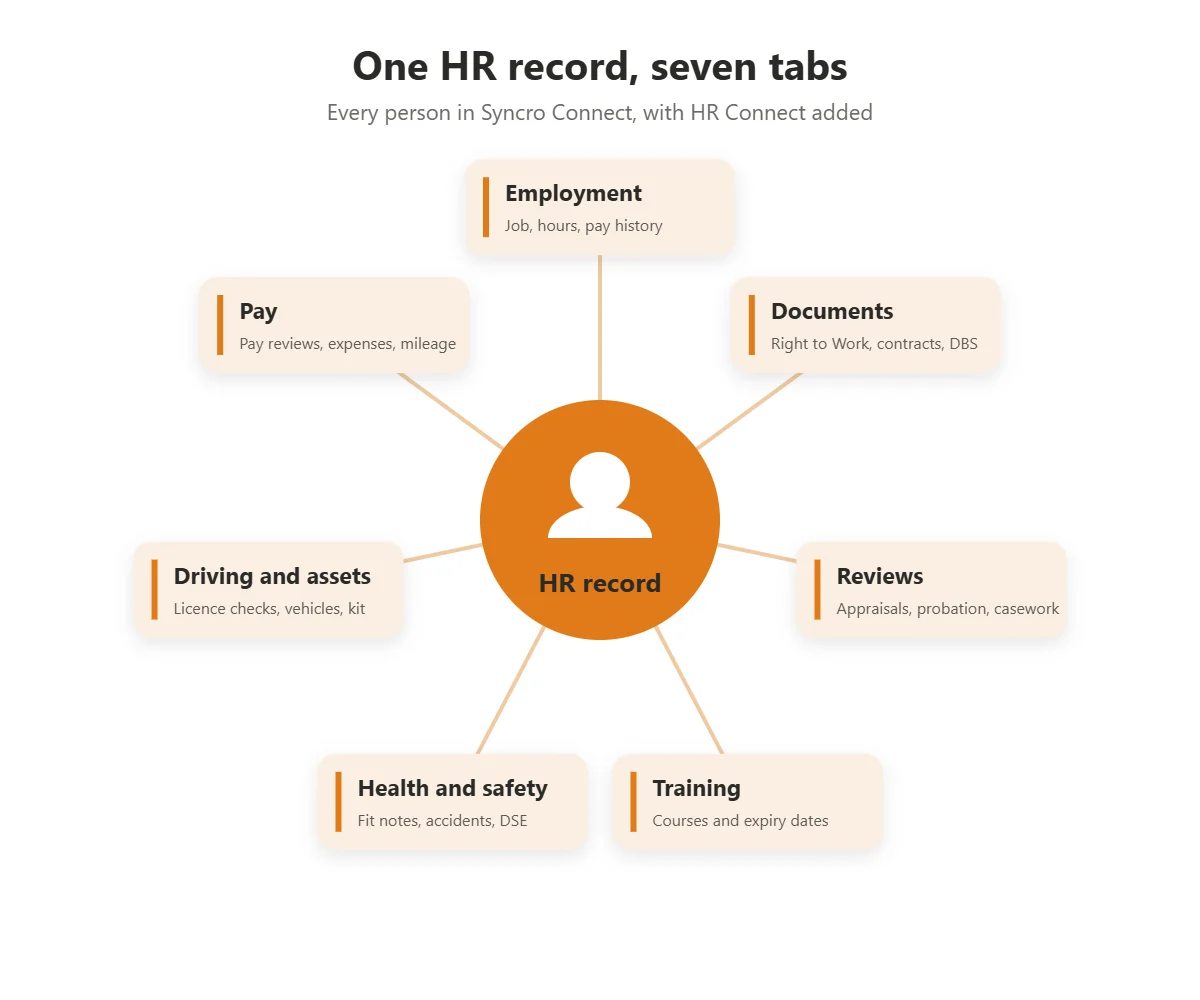
Seven tabs: employment, documents, reviews, training, health and safety, driving and assets, and pay. Changes to job, hours or pay are recorded as history, so you can see what someone earned and did at any date.
Documents with expiry dates
Contracts, Right to Work, DBS and similar, each with an issue date, an expiry date and the file. Adding the new Right to Work clears the old reminder.
Training matrix
Who holds which course and when it runs out, from your own course list. Filter by a course and see everyone who does not hold it.
Reviews and casework
Appraisals, probation reviews, disciplinary records, grievances, absence and welfare reviews and return to work interviews, each with its form and signatures.
Expenses and mileage
Every claim with totals to approve and pay, and a download. Mileage at HMRC approved rates or your own rate per mile.
Company library and messages
The handbook, policies and forms in one place, with earlier versions kept. Send a message or a policy to everyone, a site or a department by email and see who has read it.
Forms you can change
Ready-made forms for each area, from a flexible working request to biometric clocking consent and a right to work check, with signature boxes. Edit them to match your own policies.
HR reports managers can run themselves
HR Insight has eleven reports in four groups. Each one takes a date or date range, filters for site, department, job title, payroll group, employment status and pay type, and can be downloaded or printed. Managers run them for their own team, without asking HR for a spreadsheet.
- People: headcount distribution, headcount overview, personnel information and employment records
- Joining and leaving: starters and leavers, employee turnover and onboarding progress
- Coming up: upcoming events and celebrations
- Pay: gender pay gap, which employers with 250 or more staff must publish each year, and expense costs
Because HR Connect sits in Syncro Connect, the same people appear in your absence and attendance reports, with the same departments and sites.
HR that starts from attendance, not a blank form
Most small businesses keep HR in spreadsheets, shared drives and email, which is how probation reviews get missed and return to work interviews never happen. HR Connect raises those jobs from the records themselves. Since 6 April 2026, Statutory Sick Pay is paid from the first day of absence, so an accurate record of every sickness spell matters from day one.
- Someone is off sickThe absence is booked in Syncro Connect, by a manager or by the employee in the Syncro Connect app.
- They come backOnce they clock in again, a return to work interview appears on To Do, due on their first day back. If one is not needed, Not required closes it and records why.
- A pattern buildsWhen someone reaches the Bradford Factor score or number of spells you set, an absence review is raised for their manager.
- A fit note is dueAfter seven days off sick, a fit note task appears, and another if the fit note runs out while they are still off.
HR software pricing
HR Connect is a module of Syncro Connect, so it is priced per employee on top of the software, with no setup fee and nothing extra per site.
| What you get | Per employee per month |
|---|---|
| Syncro Connect time and attendance, absence and payroll export | £2 |
| HR Connect | + £1 |
| The Syncro Connect app for employee self-service (optional) | + £1 |
| Syncro Connect with HR Connect | £3, or £4 with the app |
All prices excl. VAT, billed annually, or monthly if you prefer. HR Connect is charged on licensed seats rather than seats in use. Request a quote for a larger team or several sites.
What HR Connect does not do
- It does not run payroll or produce payslips. Hours, absence and expenses go to your payroll through the Syncro Connect payroll export.
- HR is in the web software only for now. Employees read messages and policies by email; the Syncro Connect app does not show HR records yet.
- It cannot be bought without Syncro Connect. If you need HR records but do not track time or absence, a standalone HR platform is a fair choice.
- It keeps the records; it does not give legal advice. For employment law, use ACAS or your own adviser.
HR software questions
How much does HR software cost per employee?
Can managers run their own HR reports without going through HR?
Can we buy HR Connect on its own?
Is there a free trial?
Does it remind us when Right to Work documents and training expire?
Does HR Connect handle expenses and mileage?
Can employees see their HR record on their phone?
Who can see bank details and health records?
Is HR Connect suitable for a small business with no HR department?
Where is the HR data held?
How does it compare with BrightHR or Breathe?
Does it help with the April 2026 Statutory Sick Pay changes?
We use Realtime. Can we have HR?
See HR Connect with your own team
Book a demo and we will show you To Do, the HR record and the reports, or start a free trial of Syncro Connect today. Call us on 0113 350 9043.

