What is absence management software?

Absence management software records and reports on employee time off, both planned absence such as holiday and unplanned absence such as sickness. It works out entitlements, handles requests and approvals, tracks sickness patterns, and keeps an auditable record of who was off, when and why, replacing the spreadsheets, wall planners and email chains most businesses start with.

The difference between systems is mostly in the awkward cases: part time staff, irregular hours, carry over, mid year starters and sickness that spans a weekend. That is where a spreadsheet starts giving wrong answers, and where it is worth testing any system during a trial.

What changes day to day

Absence software should take work away from managers, not give them another system to feed. These are the six things customers notice first.

Managers book absence for staff in the web software at £2. Add the Leave Connect App and employees request holiday, report sickness and upload fit notes from their own phone.

  • Holiday approved in seconds

    Requests arrive with the employee’s remaining entitlement already checked. Approve or decline in one click, and the planner and balance update straight away. More on why it helps in how self-service improves holiday management.

  • Know who is off before the shift starts

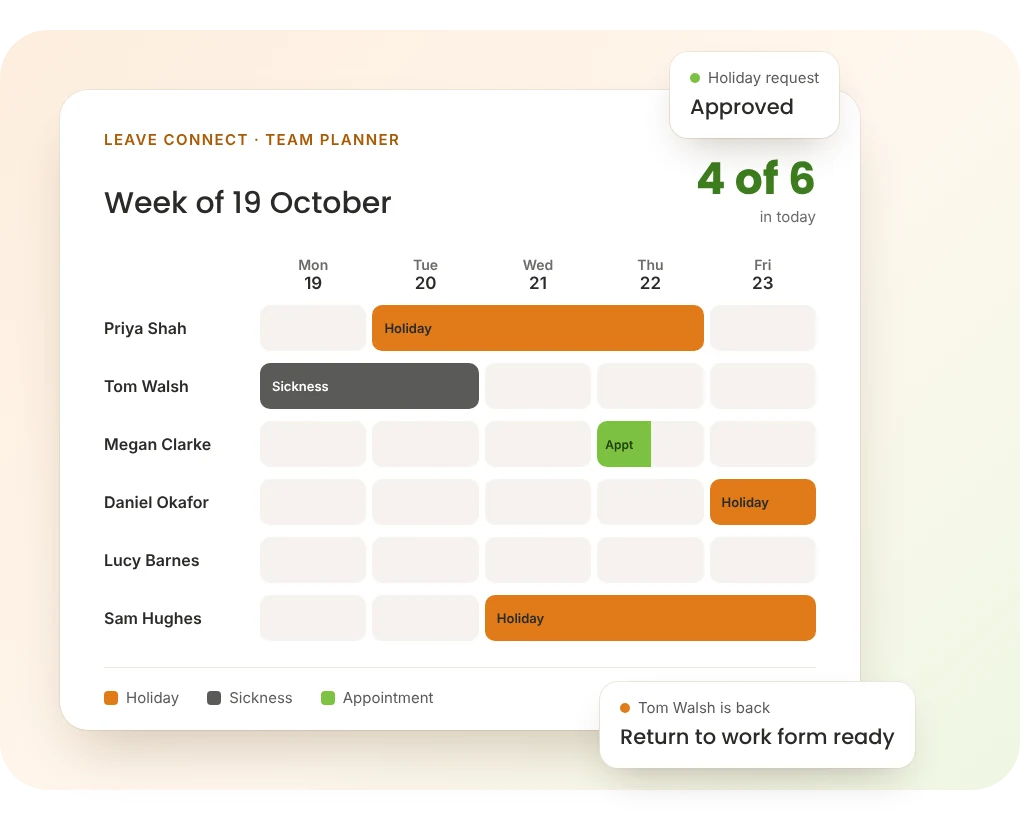
    One planner across every site and department shows holiday, sickness and appointments together, so you can arrange cover before a shift falls short.

  • Patterns show up early

    Bradford Factor scores update with every absence, so persistent short term absence is visible in March rather than discovered at the year end review.

  • Return to work happens every time

    When someone comes back from sickness, a return to work form is produced and stored against their record, so the conversation happens consistently rather than when someone remembers.

  • Unauthorised absence is flagged

    Absence that has not been booked or authorised is flagged to managers and HR with an alert, rather than surfacing as a question on payroll day.

  • Payroll gets the right figures

    Approved absence exports in the layout your payroll package expects, so nobody re-keys sickness and holiday at month end.

Sickness absence, from first call to return to work

Sickness is where most absence processes break down. Not in the policy, which is usually fine, but in whether each step actually happens for every absence and every manager.

Leave Connect puts the steps in order and records each one, so a manager three sites away follows the same process as the one in head office.

Sickness records are health data, so they are visible to the employee, their manager and the HR users you choose. Colleagues see that someone is off, never why.


  1. Absence reported

    The employee reports sickness in the app, or a manager records it in the software. The manager is notified straight away.


  2. Cover arranged

    The planner shows who else is off that day, so cover is sorted with the full picture rather than from memory.


  3. Fit note uploaded

    A fit note is needed once someone has been off for more than seven days in a row, counting weekends and bank holidays. The employee uploads it from their phone so it sits against the absence.


  4. Return to work form

    When they come back, the return to work form is produced automatically and stored with the absence record.


  5. Score and record updated

    The Bradford Factor recalculates, the spell and its qualifying days are recorded for sick pay, and the absence flows into the payroll export.

What Leave Connect includes

Everything below is in the £2 software. The app adds employee self service on top.

Features included in Leave Connect absence management software
Feature What it does
Bradford Factor scoring Calculated for every employee as absences are recorded, with persistent short term absence flagged. How the Bradford Factor works
Holiday entitlements Set up by length of service, with pro rata for starters, leavers and part time staff, carry over rules and bank holidays counted or excluded. Different sites or staff groups can follow their own bank holidays and holiday rules, such as Scottish or Northern Irish bank holidays
Requests and approvals Managers book absence for staff in the software, or staff request their own through the Leave Connect App. Entitlement is checked either way, and more than one person can approve
Sickness and return to work Individual absence histories, fit notes uploaded by staff, and return to work forms produced automatically
Unauthorised absence Absence that has not been booked or authorised is flagged to managers and HR teams with automated alerts
Absence reporting Trends across teams, departments, sites and individuals, including headcount and time lost, with what that time is worth in pay
Team planner Holiday, sickness and appointments together across every site, so clashes are visible before they happen
Payroll export Approved absence exported in the layout your package expects: Sage, Pegasus, QuickBooks, BrightPay, Xero, IRIS or ADP. See payroll exports
Multi site Every location and department managed from one system
UK data storage Absence and sickness records held in the UK, with access logged and limited to named users. See data security

What is absence really costing UK business?

£85bn

a year: the cost to UK employers of poor workplace health

Keep Britain Working, gov.uk

£120

in lost profit for every sickness absence day, on average

Keep Britain Working, gov.uk

6.7 days

of sick leave per UK worker each year, up from 3.7 in 2018

IPPR, 2024

£30bn

added to the cost of worker sickness to UK business between 2018 and 2023

IPPR, 2024

Those figures leave out the management time, the overtime to cover and the effect on the people picking up the work. Most of it is invisible while absence lives in a spreadsheet, because nobody adds it up until the end of the year.

Software does not reduce absence by itself. What it does is show you the pattern while there is still time to act on it, and make sure every manager follows the same process when they do.

The Bradford Factor

S² × D

Spells of absence squared, multiplied by total days absent, over a set period.

Four one day absences

4² × 4 = 64

One four day absence

1² × 4 = 4

Bradford Factor and holiday rules, worked out for you

Leave Connect scores every employee automatically, which is why frequent short absences stand out: the same four days off scores sixteen times higher when it comes as four separate spells.

A score is a prompt for a conversation, not a verdict. A high score can reflect a disability or a long term condition as easily as a pattern that needs addressing, so the software gives you the number and the judgement stays with you. Try our Bradford Factor calculator.

Holiday works the same way. Entitlement by length of service, pro rata for part time staff and mid year starters, and carry over with an expiry date are set up as rules, so the figure is right for everyone. Check one by hand with the pro rata holiday calculator.

Two ways to run it, priced per employee

Leave Connect Software and the Leave Connect App are the same system seen from two sides. Start with the software, and add the app when you want staff to do their own booking.

Leave Connect Software

£2

per employee per month excl. VAT

  • Managers book holiday and sickness for staff
  • Entitlements, carry over and bank holidays
  • Bradford Factor, return to work and reporting
  • Payroll exports and UK data storage

With the Leave Connect App

£3

per employee per month excl. VAT

  • Everything in the software
  • Staff request holiday and see their balance live
  • Sickness reported and fit notes uploaded from a phone
  • Syncro Kiosk for staff without a smartphone

See the Leave Connect App

A 50 person business pays £100 a month for the software, or £150 with the app. No setup fees. Prices exclude VAT. Billed annually, with monthly billing also available.

Why choose Computime for absence management?

Computime has provided absence and attendance systems to UK businesses since 1989. We are based in Leeds and support more than 800 organisations across construction, logistics, manufacturing, healthcare, facilities management and retail.

Leave Connect is part of Syncro Connect, built and supported by our own team. Absence, clocking and the employee app share one set of records, so it grows into full workforce management without changing system.

Rated 4.4 on Google and 4.4 on Trustpilot.

Absence management software FAQs

What UK employers ask about managing absence. If yours is not here, call the Leeds team on 0113 350 9043.

What is absence management software?
Absence management software records and reports on employee time off, covering planned absence such as holiday and unplanned absence such as sickness. It calculates entitlements, handles requests and approvals, tracks sickness patterns, produces reports for HR and payroll, and keeps an auditable record of who was off, when and why. It replaces the spreadsheets, wall planners and email chains most businesses start with.
What should I look for when comparing absence management systems?
Test the awkward cases rather than the demo: a part time employee, someone on irregular hours, a mid year starter and carry over into a new holiday year. Then check that staff can request leave from their phone, that sickness records are restricted to the right people, that it scores the Bradford Factor or your own triggers, and that it exports to your payroll package. Per employee pricing with no setup fee and a free trial lets you check all of that before you commit. If you already run an HR platform with good absence features, you may not need a separate system at all.
Which absence management software works with payroll?
Leave Connect exports approved absence and hours in the layout your payroll package expects, and the export is set up and tested for Sage, Pegasus, QuickBooks, BrightPay, Xero, IRIS and ADP. It is a file you import rather than a live connection. If you need a direct link into Sage Payroll, that is our Realtime system with the Sage Payroll integration module.
Does it work for large employers?
Yes. There is no minimum or maximum headcount, and Syncro Connect works across multiple sites. Pricing stays per employee, so a 1,000 person business pays £2,000 a month excl. VAT for the software, or £3,000 with the app.
What is a good Bradford Factor score?
There is no official threshold, because the Bradford Factor is a tool rather than a standard. Employers commonly set their own trigger points, often somewhere between 50 and 200 over a rolling twelve months, with escalating responses as the score rises. What matters more than the number is what you do with it: a score is a prompt to have a conversation, not evidence of anything on its own, and a high score can reflect a disability or long term condition as easily as a pattern that needs addressing.
Does it handle return to work interviews?
Yes. When an employee comes back from sickness, a return to work form is produced automatically and stored against the absence record, so every manager follows the same process. The form records the conversation; whether it happens well is down to the manager, and most of the value comes from doing it every time rather than only for the absences someone noticed.
When does an employee need a fit note?
An employee needs a fit note once they have been off sick for more than seven days in a row, counting weekends and bank holidays. For shorter absences no fit note is needed, though you can ask them to confirm the absence. GPs, hospital doctors, registered nurses, pharmacists, occupational therapists and physiotherapists can all issue one. With the Leave Connect App staff upload it from their phone so it sits against the absence. The gov.uk guidance on sick leave sets out the current rules.
How do we track statutory sick pay?
Leave Connect records the start and end of every sickness spell and the qualifying days within it, which is the information SSP is calculated from, and that flows into your payroll export rather than being worked out by hand. Rates and eligibility change, so check the current figures on gov.uk. What the software gives you is an accurate record of the absence itself, which is the part employers most often get wrong.
How is holiday entitlement calculated for part time staff?
Pro rata, based on days or hours worked. Someone working three days a week gets three fifths of the full time entitlement, and the statutory minimum in the UK is 5.6 weeks including bank holidays. It gets harder with irregular hours, term time working and mid year starters, which is where spreadsheets usually go wrong. Leave Connect applies your rules automatically, and gov.uk publishes a holiday entitlement calculator if you want to check a figure.
What if a manager is away when a request comes in?
Approvals can be set up so more than one person can action a request, which is worth deciding before you go live rather than the first time a manager is on holiday themselves. Requests stay visible until someone deals with them, so nothing is lost in an inbox.
Can absence management software reduce absenteeism?
Not by itself, and we would be wary of any supplier who says otherwise. What it does is make absence visible: patterns show up early rather than at year end, return to work conversations happen consistently, and you can see what absence is costing in time and pay. Whether that reduces absence depends on what you do next. Most of the improvement our customers see comes from acting sooner, not from the software itself. Our guide to reducing absenteeism covers what to do next.
What does absence management software cost in the UK?
Most UK systems are priced per employee per month. Leave Connect is £2 excl. VAT for the software, which covers reporting, entitlements and managers booking absence for staff, or £3 with the Leave Connect App so employees request their own holiday. There are no setup fees, and you can pay annually or monthly. A 50 person business pays £100 or £150 a month depending on which you choose.
Do we need a separate HR system as well?
Not for absence. If you also want employee records, documents and appraisals in the same place, HR Connect adds them to Syncro Connect for £1 per employee per month excl. VAT, on the same system and the same employee records. Plenty of businesses also run absence management alongside an existing HR platform and simply export the data, and we will tell you honestly which makes more sense for your situation.
Who can see sickness records?
The employee, their manager and whoever you give HR access to. Colleagues can see that someone is off, because that is how the team planner prevents clashes, but not why. Sickness records are health data, which is special category data under UK GDPR, so restricting access is part of what the law expects rather than just good practice. Our data security page sets out where the data sits and who can reach it.
How long does it take to set up?
Days rather than weeks. The work is in your rules rather than the software: entitlements, carry over, holiday year, bank holidays and approval routes. We set those up with you before you go live, bring across opening balances from your spreadsheet or old system, and check them, so the first balance an employee sees is the right one. You can also start a free trial and look for yourself first.
Leave Connect

See your own absence rules working

Start a free trial with no card, or book a demo and we will set up a part time starter and a carry over case in front of you.

Left Menu Icon