Biometric hardware

Palm detection access control

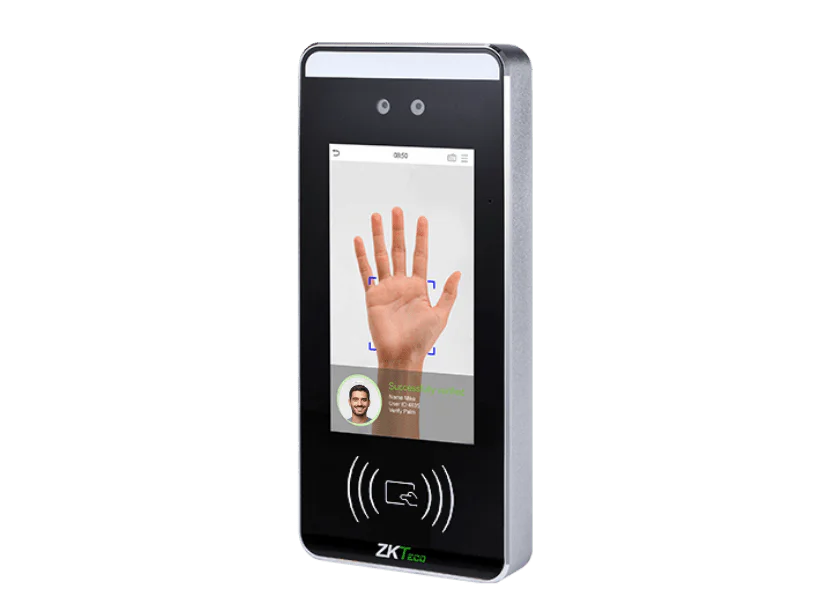
Palm detection access control lets staff open doors and clock in with a wave of the hand. The terminal reads the unique pattern of each palm, so entry is tied to the right person with nothing to carry, touch or share.

Palm terminals work alongside our access control systems and time and attendance software, so one scan can unlock the door and record the clocking.

Bioface terminal with palm detection reading an employee's palm at a workplace entrance

What is it?

What is palm detection access control?

Palm detection is a biometric identification method that reads the unique pattern of a person’s palm to confirm who they are. Because every palm is different and cannot be lost, shared or copied like a card or fob, it gives you a reliable way to control who enters your building and to verify who is clocking in.

The scan is completely contactless. Staff hold a hand over the reader and the terminal does the rest, with no shared surfaces to touch. That makes palm detection a strong fit for food production, healthcare and any site where hygiene matters, alongside our wider biometric time and attendance range.

Why choose palm detection?

Four reasons palm terminals earn their place at the door.

Fully contactless

Staff never touch the reader. There are no shared surfaces, which keeps entry hygienic in food production, healthcare and high-traffic sites.

Verified entry

A palm cannot be lent to a colleague the way a card or PIN can, so every entry and every clocking is tied to the right person.

Nothing to lose or replace

No cards to reissue, no fobs to chase and no forgotten PINs. Enrolment takes moments and staff always have their credential with them.

Access and clocking in one

The same scan that opens the door can record attendance in your time and attendance software, with hours ready for payroll.

Secure, private and straightforward

Palm terminals are built for busy workplaces and designed with staff privacy in mind.

The terminal stores a mathematical template, not a photograph or image of the palm. The template cannot be turned back into a picture of your hand.
Recognition takes around a second, so the terminal keeps up at shift changeover and busy entrances.
Card, PIN and app options are supported alongside palm scanning, so you can offer staff a genuine alternative to biometrics.
Clockings feed straight into payroll: Realtime integrates directly with Sage Payroll, with export for Pegasus and QuickBooks.

Where palm detection works best

Palm terminals suit any workplace, but they earn their keep fastest in these settings.

Hygiene-critical sites

Food production, healthcare and labs, where a no-touch scan removes a shared contact point at the door.

Secure areas

Server rooms, stockrooms and cash offices, where entry must be tied to a named person rather than to whoever is holding a card.

Hands-on trades

Manufacturing and workshops, where worn or marked fingertips can make fingerprint scanning less reliable but palms read cleanly.

Mixed on-site and mobile teams

Palm terminals at the door for site staff, with the clocking in app for anyone working away from base.

Why choose Computime?

We started with the clocks, not the software. Computime has supplied and supported clocking and access hardware for 30+ years since 1989, and palm detection sits alongside our biometric range of fingerprint and facial terminals.

Every terminal is installed and supported from Leeds by our own UK team, and connects to the same platform that handles your time, attendance and absence.

800+
UK businesses
30+
Years since 1989
4.5
Google rating
UK
Based support

Palm detection access control FAQs

How does palm detection work?

The terminal scans the unique pattern of a person’s palm and converts it into a mathematical template. When someone holds a hand over the reader, the scan is compared with stored templates and the door unlocks or the clocking is recorded in around a second. The scan is completely contactless.

Does the system store an image of my palm?

No. The terminal stores a mathematical template, not a photograph or image of your hand. The template cannot be reverse engineered back into a picture of your palm, and it is deleted from the terminal and the system when someone leaves.

How does palm detection compare with fingerprint and facial recognition?

All three tie entry and clocking to the right person. Palm detection is contactless like facial recognition, and it reads reliably where worn or marked fingertips can make fingerprint scanning less consistent. Some staff also prefer a palm scan to a camera. We can help you choose the right mix for your site.

What if some staff prefer not to use biometrics?

Our terminals support card, PIN and app options alongside palm scanning, so you can offer staff a genuine alternative. The ICO advises employers using biometrics to provide one, and we can set this up as part of your installation. See the ICO guidance on biometric recognition for more detail.

Can the same terminal handle clocking in and out?

Yes. The same palm scan that opens the door can record a clocking in your time and attendance system, so you get verified hours and controlled entry from one piece of hardware.

Does it work with payroll?

Yes. Verified clockings flow into your time and attendance records, and Realtime integrates directly with Sage Payroll, with export for Pegasus and QuickBooks, so hours reach payroll without rekeying.

Left Menu Icon